Benefits & union funds
Track health, pension, annuity, vacation, and working dues from your logged work, manage fund offices and their accounts, reconcile what the funds actually received, and pull the quarterly remittance report.
If you work under a union contract, a slice of every eligible engagement goes to your benefit funds — Health & Welfare, Pension, Annuity, and Vacation/Holiday — plus working dues. Function TimeTrack tracks all of it from the same timesheets you already log, so you can see what's accruing, catch money that never reached a fund, and produce the quarterly report your fund office expects.
This page covers the two places benefits live in the app — the Benefits page and the Quarterly Benefits Report — and the one rule that ties them together: your contribution amounts come from your logged work, not from numbers you type in by hand.
Where the numbers come from
Every benefit figure is derived from your timesheets and your contract's fund rules. Log complete, accurate weeks — real call times, real meal breaks, the right work type — and the benefits follow. Skip a break or mislabel a day and the funds that key off your gross will be off too.
Your funds depend on which agreement you're under
There is no single "IATSE fund." The agreement you worked under decides where the money goes, and the three regimes in this app behave differently enough that reading one across to another will give you a wrong number:
| Agreement | Where the fringes go | What you see |
|---|---|---|
| ACT / Pink contract (Broadway & road) | IATSE National Benefit Fund | Contributions computed from your gross. |
| Local One | Local One's own fund ("Fund One") | Its own percentages, on its own basis. |
| IATSE Local 52 (NY studio mechanics) | Motion Picture Industry Plans | Employer-paid cents per hour — see below. |
Local 52 fringes never appear on your paystub — and that is correct
Under Local 52 the employer pays fixed cents-per-hour into the Motion Picture Industry Pension, Health and Individual Account Plans, plus a percentage of the scale hourly to the Individual Account Plan. None of it is withheld from you, so none of it prints on your stub. The only trace is a header field counting the hours the fringes were computed on. A Local 52 stub with no fund line on it is not a missing contribution.
Never read one Local's rule across to another
There is no reciprocity between Locals: hours banked with one Local count toward no other Local's threshold. That is why nothing on the Benefits page is summed across Locals, and why a Pink-contract rule may not be cloned onto a Local One deal (or the reverse).
The model in one minute
Function TimeTrack keeps benefits in two tiers:
- A fund office is who you remit to — the IATSE National Benefit Fund, the MPI Plans, and so on.
- A fund (account) sits under an office and is a destination with a type and a tax treatment — Health, Pension, Annuity, Welfare, Vacation, Training, or Combined.
- A contribution is the rule — how much goes in — and it is configured per contract, not on the fund. The same fund can take a different rate under a different deal.
On tax treatment:
- Health & Welfare, Pension, and Annuity are contributed above the line — the employer pays them on top of your gross, and they aren't taxed to you.
- Vacation / Holiday (sometimes called TET) is in-gross — it's part of your taxable wages.
Reports tag these with
in-gross.
The Benefits page
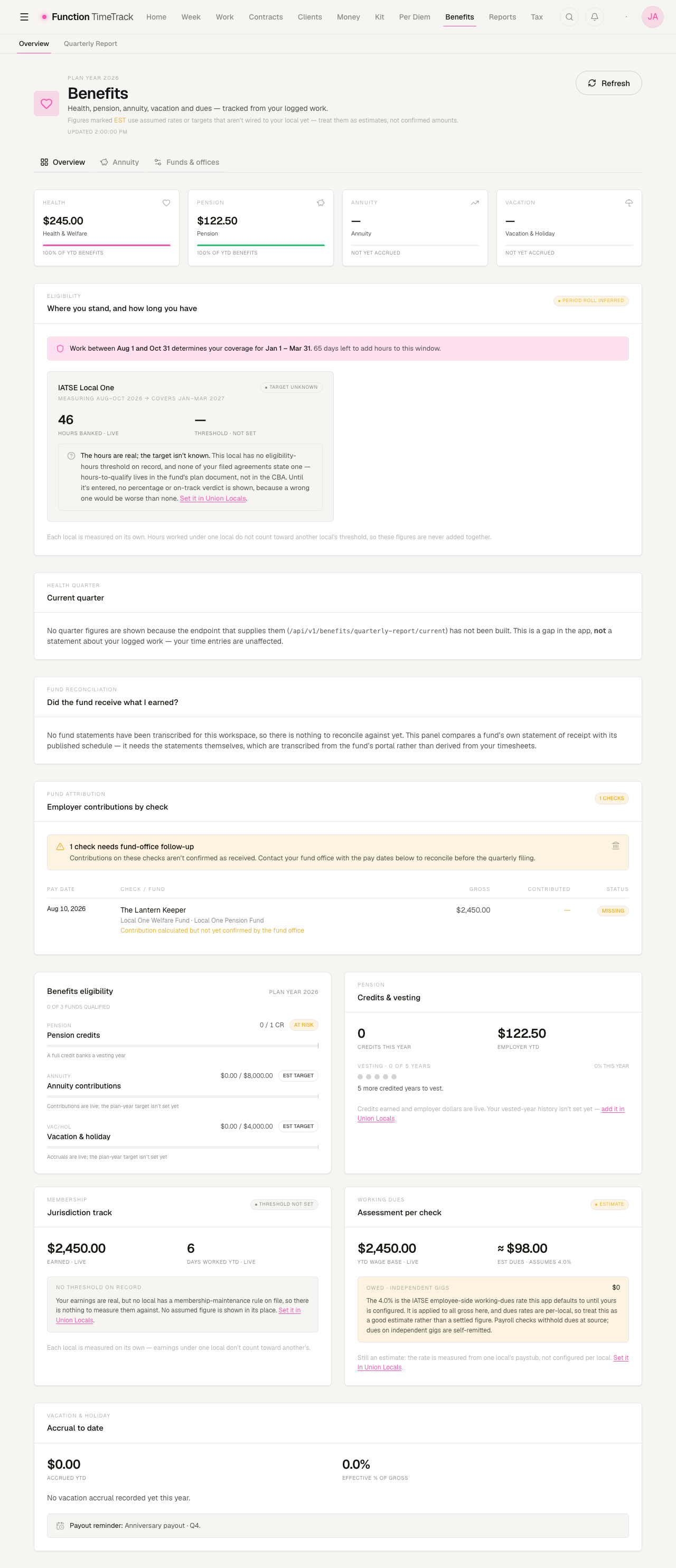
Open Benefits from the main navigation. The header shows the current plan year, a Refresh button with a last-updated time, and three tabs: Overview, Annuity, and Funds & offices.
Why the reconciliation panel may be empty
Near the bottom, "Did the fund receive what I earned?" compares a fund's own statement of receipt with its published schedule. It needs the statements themselves, which are transcribed from your fund's portal — they are not derived from your timesheets, so the panel stays empty until statements exist for your workspace, and says so rather than showing a zero.
This panel used to show rows belonging to a different workspace. It no longer can: the statements are scoped to the workspace that owns them, and a workspace with none sees none.
Overview — what's accruing, and what's still owed
Top to bottom:
- The benefits strip — four cells for Health & Welfare, Pension, Annuity, and
Vacation & Holiday, each with its year-to-date employer contribution. Pension reads in
credits, not dollars — that's how vesting is measured. A cell reading
—just means nothing has posted to that fund yet this year. - Eligibility standing — the only card on the page that looks forward. Per Local, in the window currently being measured: hours banked, the threshold, days left in the window, what your already-planned days would add, and which coverage months this window buys.
- Health quarter — the qualifying-days-and-hours card (see the warning below).
- Fund reconciliation — did the fund actually receive what you earned?
- Employer contributions by check — the fund-attribution ledger.
- Detail cards — eligibility, pension credits, membership track, working dues, and vacation accrual.
The Health quarter card is currently a known gap
The endpoint that supplies quarter figures has not been built, so this card says so in plain words rather than showing numbers. That message is about the app, not about your ledger — your time entries are unaffected. Use Eligibility standing above it for the question the card was meant to answer; it is per-Local, honest about an unknown threshold, and it draws no bar it cannot justify.
Three rules the eligibility card enforces
- An unknown threshold renders as unknown. Where no threshold is configured, the card shows your banked hours and says the bar is not set. It draws no progress bar and passes no verdict — an invented bar would report either a crisis or a false all-clear.
- Nothing is summed across Locals. There is no reciprocity, so there is no total row.
- Planned hours are never banked hours. A projection sits in its own strip with its own label. A plan has never kept anybody's coverage.
What's still an estimate
Some figures use an assumed rate because the per-Local configuration isn't wired in. They carry an
ESTIMATE tag and name where the number came from:
- Working dues — the rate is measured from one Local's paystub, not configured per Local. Good as an estimate; not a settled figure for any other Local.
- Annuity and vacation plan-year targets — the dollars contributed are always live; only the target line is assumed.
The membership earnings threshold is no longer assumed: where your Local carries an authored earnings rule, the card uses the real figure and says so. Where it doesn't, it shows the earnings and states there is nothing to measure them against — it does not substitute a guess.
Fund reconciliation — did the money arrive?
Three independently-derived figures per fund per period, side by side:
| Column | Means |
|---|---|
| Received | What the fund's own statement says it got — evidence of receipt only. |
| Owed | What the fund's own published schedule says. The money question. |
| App | What your authored contribution config computes. The config question. |
A statement figure never silently overwrites a computed one. Where they disagree, the panel offers exactly one action — log the delta — which files a reconciliation item for you to accept, reject, or dispute. Nothing is decided behind your back.
The contributions ledger — catching missing money
Employer contributions by check groups every paycheck by pay date and shows the gross, the dollars contributed, and which fund they went to. A check is flagged MISSING when it's a union check but no confirmed contribution reached a fund — either nothing was recorded, or an amount was calculated but the fund office hasn't confirmed receipt. When anything is flagged, a nudge banner appears at the top with a count.
How to work the ledger:
- Scan the Status column for MISSING badges. Rows badged ON FILE are fine.
- Read the reason under the check — e.g. "Union check with no employer contribution recorded."
- Note the pay date(s).
- Contact your fund office with those dates before the quarterly filing.
A MISSING flag is a to-do, not an error
It means a union check has no confirmed contribution behind it. Chase the pay date with the fund office. And remember the Local 52 case above: an employer-paid, cents-per-hour fringe was never going to appear on the check in the first place.
The Annuity tab
Two columns that are never added together:
- Contributed — derived from your priced weeks. What the engine says went in.
- Accumulated — what a statement said the account actually held, on a date.
The gap between them is market movement, plan fees, remittance lag, and vesting — the surface
names it "not explained by contributions" rather than calling it a return, because it isn't one.
With no statement recorded it says "No statement recorded" rather than showing $0. With a
single reading it shows one dated figure and refuses to draw a trend line through one point. There
is no projection and no assumed growth curve anywhere on this tab.
Funds & offices
The Funds & offices tab is one surface where accounts are grouped under their fund office — the two-tier model rendered as one structure rather than two rival lists.
Four summary cards sit on top: Fund Offices, Total Funds, Active Funds, and Fund Types in use. Below them a search box (name, short name, or union Local), a fund-type filter, and an Active / Archived / All status control. The list defaults to Active.
Add an office, then its accounts
- Click New office and name who you remit to (e.g. IATSE National Benefit Fund).
- Click New fund — or New account on the office group — and give it a name, optional short name, type, and the Local it belongs to.
- Save. The account appears under its office, ready to be referenced by a contract.
Edit or archive
- Edit — on either tier, to change name, type, office, or Local.
- Archive — hides it from the default list. Archiving is not deletion: history is preserved, and the Archived or All filter finds it again.
Where you actually set the contribution rate
This tab defines what a fund is and who you remit to. How much you contribute is configured on the contract (Contract edit → Union / Local → fund contributions), because the same fund takes a different rate under a different deal.
The Quarterly Benefits Report
Union funds are remitted quarterly, and the Quarterly Benefits Report (Benefits → Quarterly Report) is the read-only view you file against. Pick a year and quarter, and optionally filter by a single fund or contract. The report groups every contribution by Union Local → Fund.
Four tiles summarize the quarter: Quarter total, Fund line-items, Periods, and Union Locals, with the covered date range.
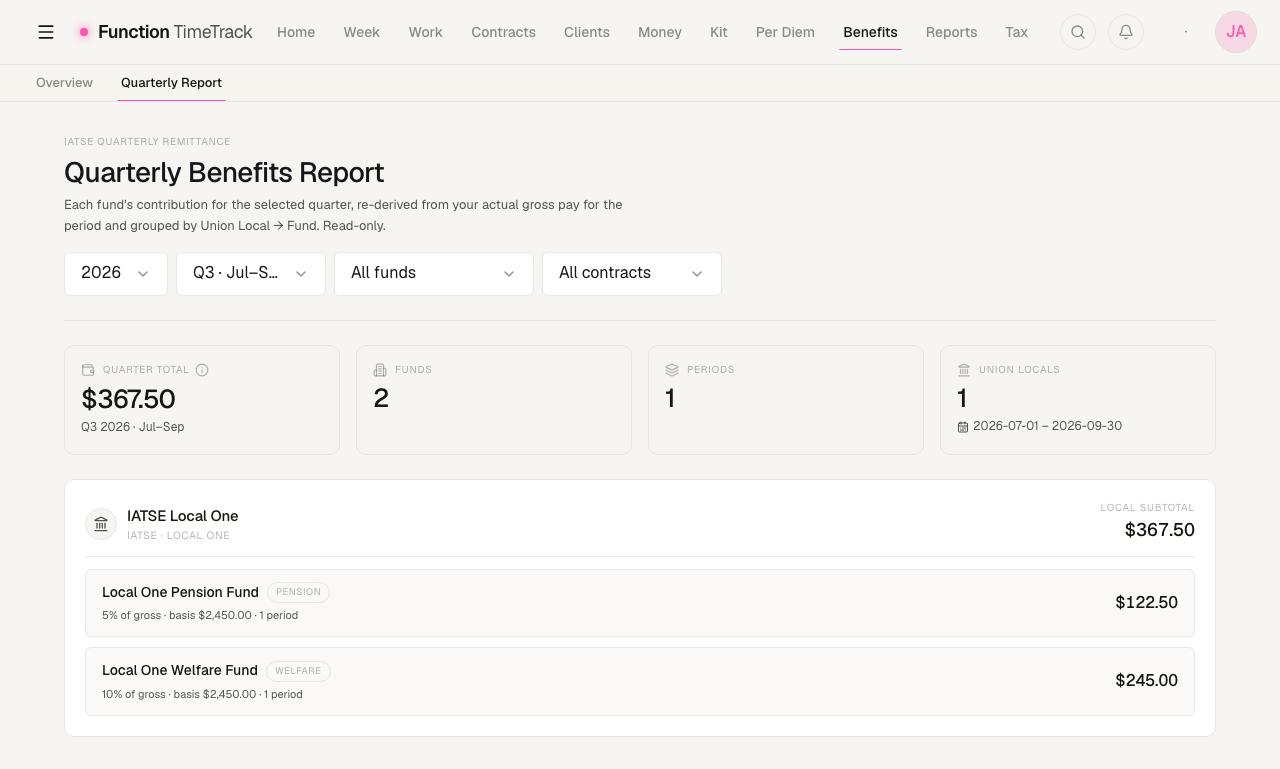
- the fund name, type, and an
in-grosstag if it's taxable, - the method —
X% of gross,$X/hr,$X/day,$X/wk,$X flat, orvarieswhen a fund is fed by more than one method, - the basis it was calculated on and the number of periods,
- the fund total.
Expand a fund to audit every period that fed it: period start date, project, basis, and contribution.
Honest by construction
Every figure is re-derived from each period's engine-truth gross — recomputed, never read back from a stored number. A quarter with no timesheets carrying configured fund contributions shows an empty state rather than a fabricated total. A blank quarter means "nothing to remit here," not "something failed."
Union Locals — /unions
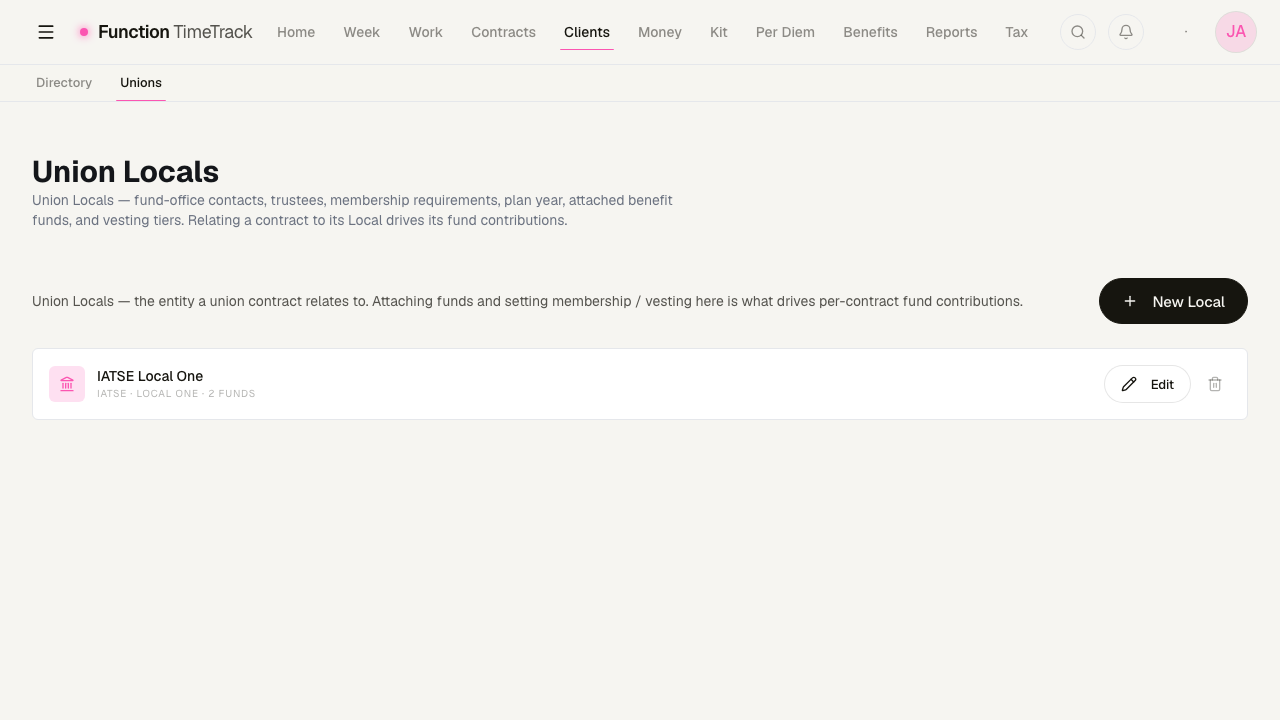
A fund belongs to a Union Local, and the Local is a record in its own right. You reach it from Clients → Unions, not from Benefits — it sits with the other counterparties in your workspace rather than with the money — but it is what makes the money work: relating a contract to its Local is what drives that contract's fund contributions.
Each Local carries its fund-office contacts and trustees, its membership requirements, its plan year, the benefit funds attached to it, and its vesting tiers. The list shows each Local with its parent union and how many funds hang off it; New Local adds one, and Edit opens the rest.
/union and /unions are different pages
/unions (plural) is this register, inside the app. /union (singular) is a page on the
public marketing site describing what the app does for union crew — supported agreements,
overtime tiers, meal penalties, fund contributions. It holds none of your data and needs no
sign-in.
Tips & gotchas
- Know which regime you're under. Pink, Local One, and Local 52 route to three different fund systems with three different bases. A rule from one is not evidence about another.
- Pension is measured in credits, not dollars. The dollars your employer contributed are shown separately.
- In-gross funds are taxed; above-line funds aren't. Vacation/Holiday is part of your taxable gross; Health, Pension, and Annuity are paid on top.
- Archiving is reversible-friendly. Archived offices and accounts keep their history.
- A MISSING flag is a to-do. Chase the pay date before you file the quarter.
- Refresh after logging work so accruals reflect your latest week.
- Set contribution rates on the contract, define funds here. If a fund's dollars look wrong, check the contract's fund-contribution rule first — that's where the rate lives.
Expenses
Log what went out, triage the charges your bank sent over, keep the deductible ones separate from the merely work-caused ones — and see which receipts a contract clause says you are owed back.
Taxes & withholding
Set up your filing status, state, and rates so Function Timetrack can estimate the tax withheld (W-2) or set aside (1099) on every paycheck — and read those numbers with confidence.