Expenses
Log what went out, triage the charges your bank sent over, keep the deductible ones separate from the merely work-caused ones — and see which receipts a contract clause says you are owed back.
Everything that went out lives at Money → Expenses. One page, two modes, and a second page for the different question of what am I owed back.
The two modes are:
- All expenses — the ledger. Everything you have filed, with totals, filters and analysis.
- To review — the triage queue for card charges your bank imported but you have not ruled on yet.
If you are looking for "Spent" or the "expense inbox"
Both folded into this page. /money/spent and /expenses/inbox are redirects now — the first
lands on the ledger, the second on ?view=review. There used to be three places to answer one
question and no way to tell which was authoritative. There is one.
The ledger
Logging one fast
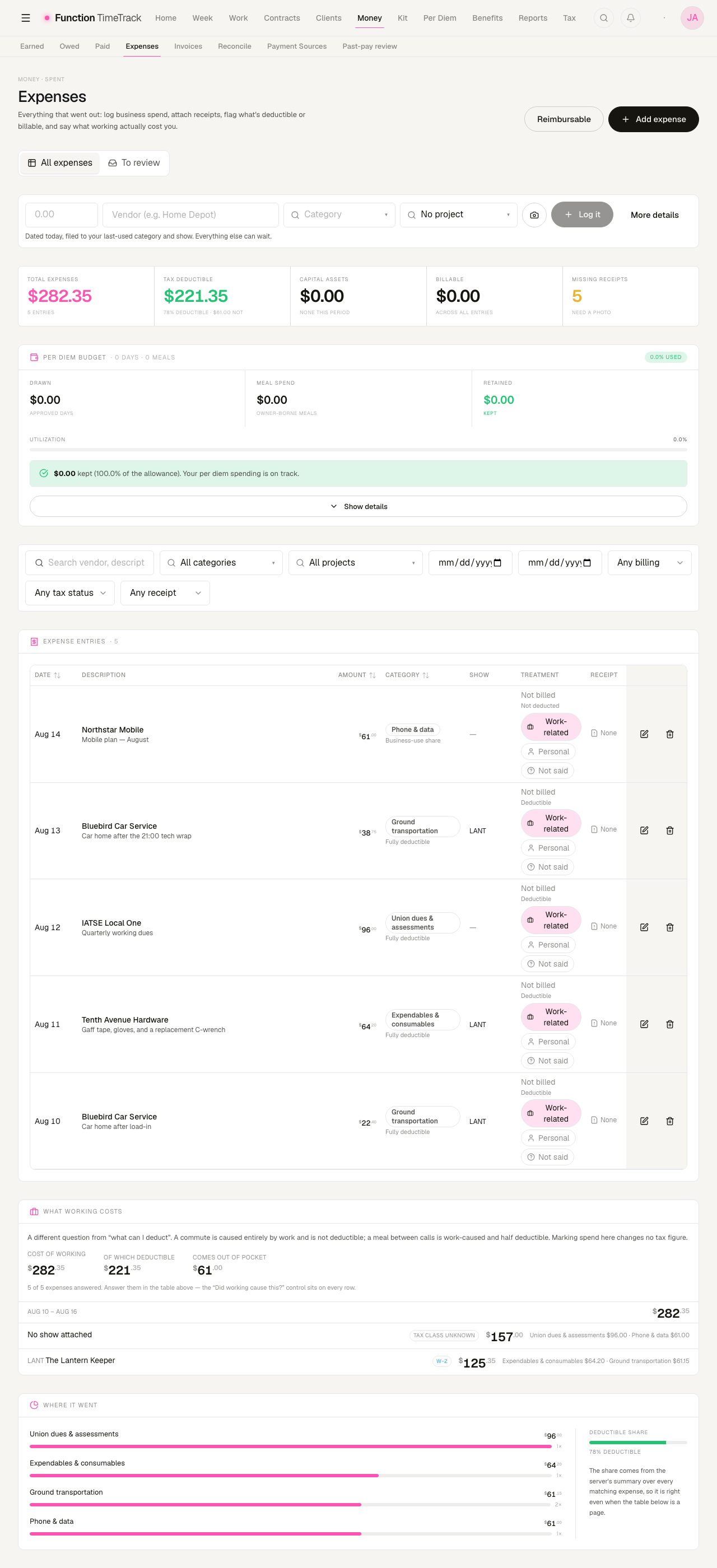
The row at the top is the common case: an amount and a vendor. Everything else is guessed — it is dated today and filed under the category and show you used last. More details opens the full form when you need the rest of it; the camera icon attaches a receipt.
If a saved expense does not appear
It is almost certainly hidden by a filter you still have applied, and the page will say so — it names the filter and offers to clear it. It does not quietly widen the query, because then the table and the totals above it would be describing different sets of rows.
The five tiles, and what each one actually measures
This is the part worth reading slowly, because two of them answer questions people assume are the same question.
| Tile | What it measures |
|---|---|
| Total expenses | Everything in the current filter |
| Tax deductible | The rows you flagged as deductible, minus anything counted as a capital asset |
| Capital assets | Gear substantial enough to be capitalised rather than deducted this year |
| Billable | Costs you intend to bill on to a client |
| Missing receipts | Rows with no photo attached |
"Fully deductible" on a row is not the same as the deductible total
The badge under a row's category is that category's ordinary tax treatment — what a cost of that kind usually is. The Tax deductible tile counts only rows where you have set the deductible flag. A brand-new expense is badged "Fully deductible" and contributes nothing to the tile until you say so. That is deliberate: the app will not claim a deduction on your behalf.
Categories carry their tax treatment
There is one canonical list of categories, grouped into travel & subsistence, gear & materials, on the production, running the business, cost of money, professional & union, and not spending (card payments and transfers between your own accounts, which are named and priced at zero rather than dropped).
Each category states its own treatment, and the honest ones are the interesting ones:
- Fully deductible — an ordinary and necessary cost of the work.
- Business-use share — a phone bill. Deductible in the proportion you actually use for work, which no software can know for you.
- Capitalised — a tool with a life beyond this year.
- Needs review — a row still filed under an old category name from before the taxonomy existed. It is flagged rather than guessed at. Re-file it and its real treatment applies.
The category pill in the table is a picker — click it to re-file a row without opening the form.
"Did working cause this?" is a separate question
Every row carries a three-way control: Work-related · Personal · Not said.
This is a different axis from deductibility, and mixing them up is how "what does working actually cost me?" became unanswerable. A commute is caused entirely by work and is not deductible. A meal between calls is work-caused and half deductible. A haircut is neither.
Not said is a real answer, not a default that means "personal". Nothing that computes a deduction, an income figure or a tax figure reads this column — setting it moves no money.
The What working costs panel below the table is what the axis is for: the cost of working, how much of that is deductible, and what came out of pocket, broken down by show.
Where it went
The last panel ranks your spend by category with a deductible-share meter. The percentages come from the server's summary over every matching expense, so they stay right even when the table above is showing only the first page.
Filters
Every filter reaches the server — the table, the totals, and any report generated from them all describe the same rows. Nothing is re-filtered in the browser. The table pages explicitly and says what it is showing ("Showing 100 of 340"), so the row count never disagrees with the totals.
Reviewing bank charges
Switch to To review and the page becomes a triage surface for charges imported from a connected card. Each carries a suggested category and a starting answer about who bears the cost. You sweep a week with one project pick, one category and one button.
- Approving files the charge as a real expense. Until then it is not in the totals above — and cannot be, because those are a server aggregate over filed expenses and an unreviewed charge is not one yet. The total moving when you approve is the honest behaviour.
- Denying leaves a record you can undo rather than deleting the row.
- Refunds get their own section above the queue. A credit is not something you "approve" — the question it asks is which charge does this reverse.
Bank connections in the header goes to the card setup.
Reimbursable — what a contract owes you back
Some of what you spend is not yours to absorb. A contract can say the employer buys the ride home when the call runs long, and until the app could express that, every one of those receipts sat in your ledger looking like money you lost.
Reimbursable in the Expenses header is the other end of that.
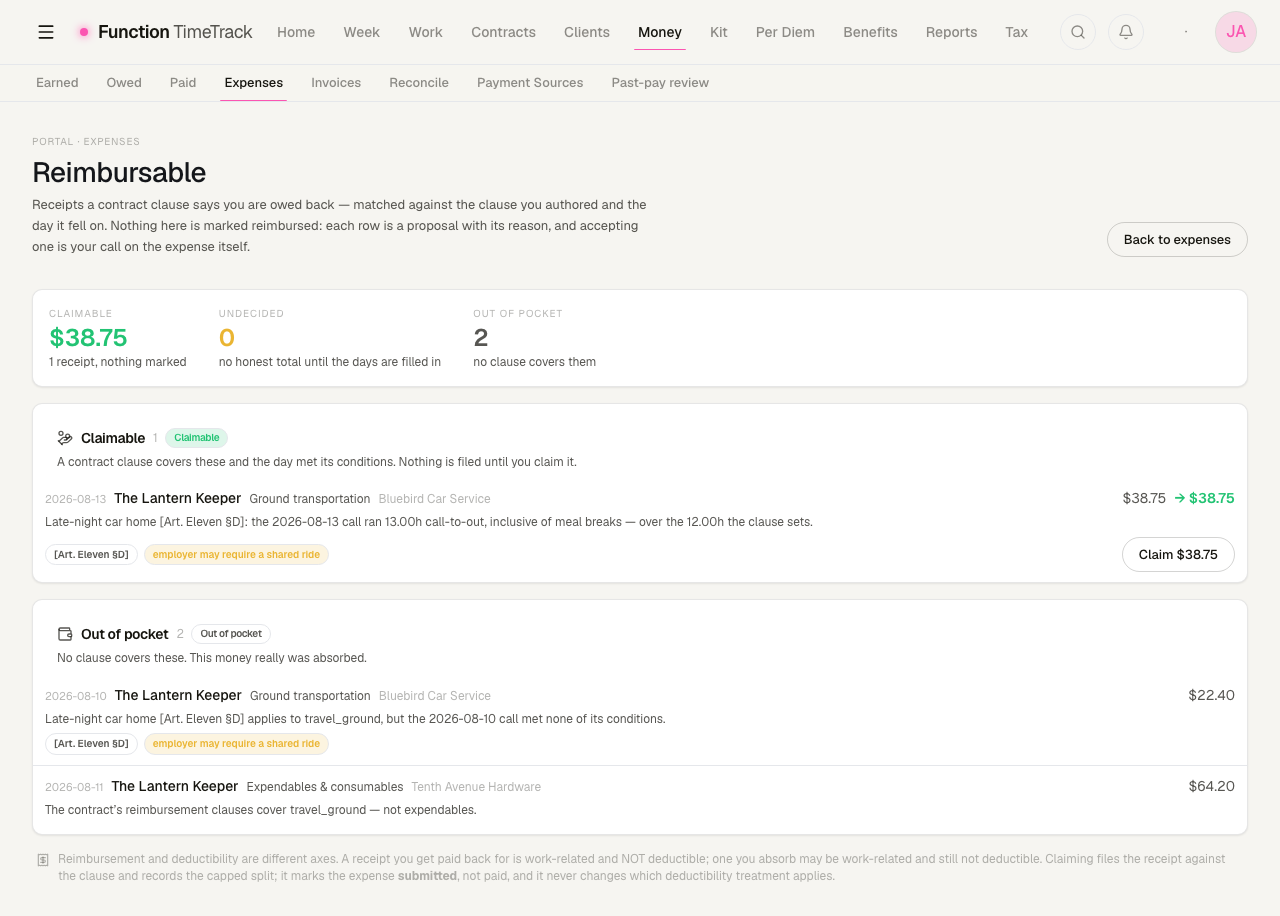
Three buckets, and the third one is the point:
- Claimable — a clause covers this receipt and the day's facts fired one of its triggers. The proposed amount is shown, capped where the clause caps it.
- Undecided — a clause covers it, but the day cannot answer. No amount is shown and no total is offered, because there is no honest one. These are not worth zero; they are worth we do not know yet.
- Out of pocket — positively not covered. Either no clause claims that category, or every trigger was readable and none fired. This money really was absorbed.
Each row states its reasoning in a sentence — which clause, which trigger, what the day measured. In the picture: "the 2026-08-13 call ran 13.00h call-to-out, inclusive of meal breaks — over the 12.00h the clause sets." The 2026-08-10 call ran nine hours and is in the other bucket for the same clause.
Where the clause comes from
A transport clause is a term on your contract (or on a rider scoped to one show). It carries:
- Triggers on the day — elapsed call-to-out hours, worked hours, an end time past a wall-clock boundary, or a turnaround below some threshold. Any one firing is enough.
- A cap — "up to $40.00".
- A category scope — "for cab rides". A clause with no category scope claims nothing and never proposes anything. That is deliberate: an unscoped clause is an unfinished one, not a wildcard, and it is what keeps a transport clause off a hardware receipt.
- An employer-side condition, where the contract states one — "the employer may require shared rides". It is a disclosure carried onto the proposal; it never changes the verdict or the amount.
Claiming
Claim files the receipt against the clause and records the capped split. It moves the expense to submitted — never to reimbursed, because nothing here knows the money arrived. Marking a reimbursement that never came removes a real deduction and overstates your income, so that decision stays with you.
Reimbursement and deductibility are different axes
A receipt you get paid back for is work-related and not deductible. One you absorb may be work-related and still not deductible. Claiming changes who bore the cost; it never changes which deductibility treatment applies.
Per diem sits above the table
The Per diem budget card on the ledger shows drawn days, meal spend, and what you retained out of the allowance — the tour question of am I keeping any of my per diem. It narrows to the show you have filtered to. See Per diem & travel for how the allowance itself is priced.
Kit & equipment
Bill your own gear on a show — the equipment catalog, reusable kits, physical inventory units with serials, and the kit fees that turn all of it into money you are owed.
Benefits & union funds
Track health, pension, annuity, vacation, and working dues from your logged work, manage fund offices and their accounts, reconcile what the funds actually received, and pull the quarterly remittance report.