The show page
Every production has a page of its own — what it has earned, which paper governs it, its phases and riders, its people and documents — plus an editor where you set the phase → contract → rider timeline that prices every day you log.
Every show you work has a page. You reach it from Work — the row's Open show action, or by clicking through from the Week grid — and it is where a production stops being a name in a list and becomes a thing with money, paper and a run attached.
There are two of them, and the app picks which one you get:
- The detail view, for a show that is real — actuals, run ledger, the deal.
- The planned view, for a verbal hold with nothing tracked yet — projections and the blockers standing between you and confirming it.
How the app decides
You get the planned view only when the show's status is on hold and no time has been logged against it. The moment you log a single day, the actuals view takes over. Nothing to configure — tracking time is what promotes a hold to a show.
The detail view
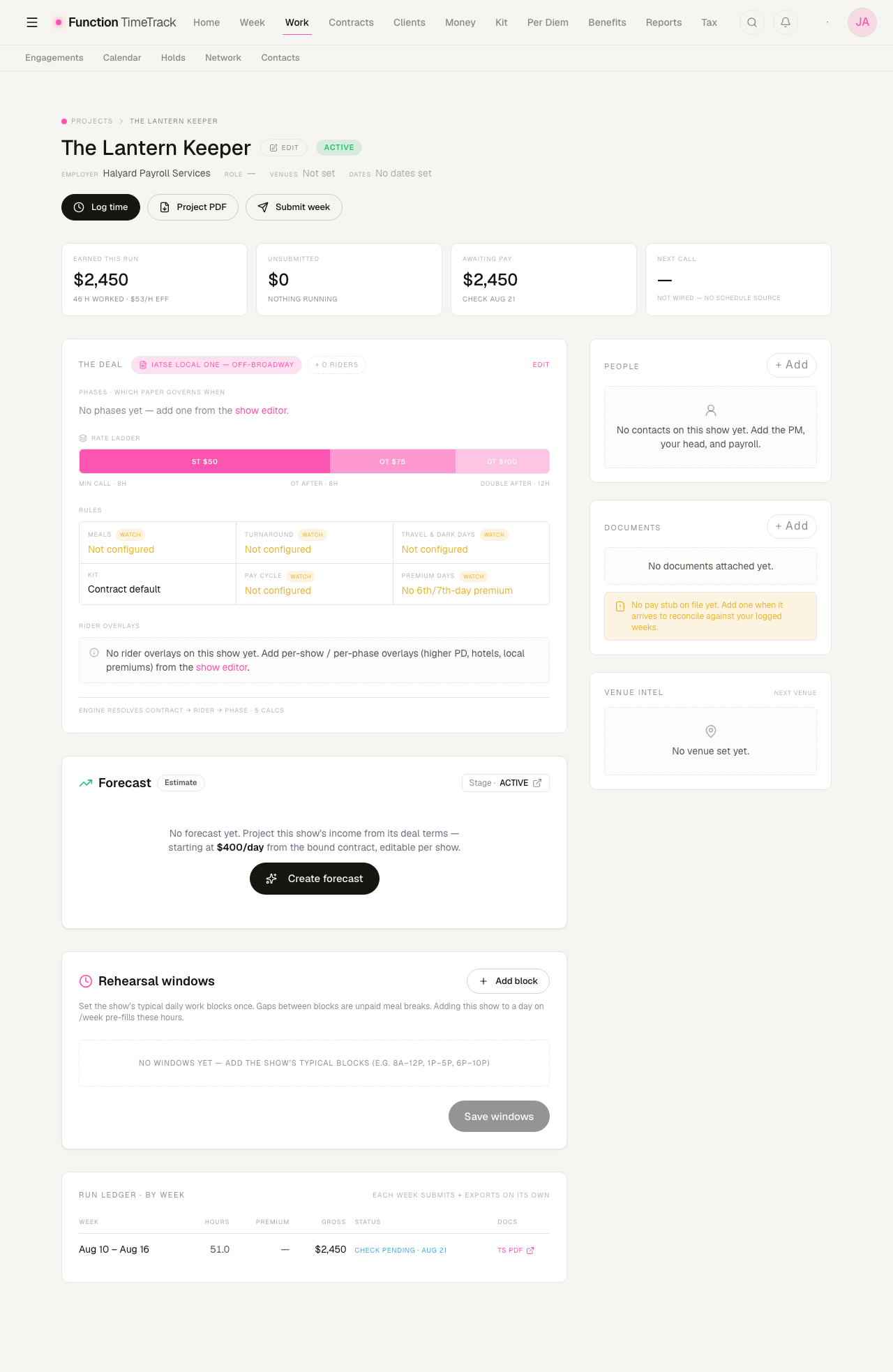
The masthead
The show name, its status, the employer, your role, venues and dates — plus three buttons that are the three things you most often came here to do: Log time, Project PDF, Submit week.
The four tiles
| Tile | What it says |
|---|---|
| Earned this run | Gross across every week logged on this show, with hours and an effective rate |
| Unsubmitted | Money sitting in weeks you have not submitted yet |
| Awaiting pay | Submitted and not yet paid, with the expected check date |
| Next call | The start of the next upcoming phase |
The hours figure on the first tile is ELAPSED, not worked
It counts call-to-out including unpaid meals — the demo week reads 51 H for a week that worked 46, and the effective rate is gross ÷ 51. The Timesheets page reports the same week as 46.0h at $53.26/hour. Both numbers are real; they measure different things and both are labelled "hours". Trust the timesheet figure when you want what you were paid for the work.
Next call reads "— not wired — no schedule source" until the show has phases. There is no call-sheet model in the app, so the honest signal is the start date of your next phase; the tile says so rather than inventing one.
The deal card
This is the paper, resolved. It shows:
- Which contract governs, and how many riders overlay it.
- Phases — which paper governs when. A show with no phases says so and links you to the editor.
- The rate ladder — straight time, overtime and doubletime as a proportioned bar, with the minimum call, the OT threshold and the DT threshold underneath. In the demo: ST $50, OT $75, DT $100, 8-hour minimum call, OT after 8, double after 12.
- Rules — meals, turnaround, travel and dark days, kit, pay cycle, premium days.
The amber WATCH chips are the useful part
A rule reading Not configured in amber is one your contract does not answer. That is not a bug and not a zero — it is the app declining to assume a default on a term that costs money. Configure it on the contract and the chip goes.
The footer states the resolution order plainly: contract → rider → phase. Every day you log is priced by its own day's phase, rider and contract, in that order.
Forecast
Projects the show's income forward from its deal terms, seeded from the contract's own projected day rate (in the demo, $400/day — eight hours at $50). It is editable per show, and you can compare it against actuals as the run goes. Create forecast starts one.
Rehearsal windows
Set the show's typical daily blocks once — "8A–12P, 1P–5P, 6P–10P" — and adding that show to a day on the Week grid pre-fills those hours. Gaps between blocks are unpaid meal breaks. This is the single highest-value setting on the page if you work a show with a regular rhythm.
The run ledger
One row per week: the dates, hours, premium, gross, pay status and a link to that week's timesheet PDF. Each week submits and exports on its own.
The right-hand rail
- People — a real contact roster for the show: name, role, how to reach them, and an approves timesheets flag. Roles come from your own contact-role vocabulary.
- Documents — per-show documents grouped by kind. The amber "No pay stub on file yet" nudge is wired to real presence: it fires only when no document of kind PAYSTUB exists, and it goes when you add one.
- Venue intel — shows the venue when the show has one set. Venue notes drawn from run history are marked coming and are not built.
The show editor
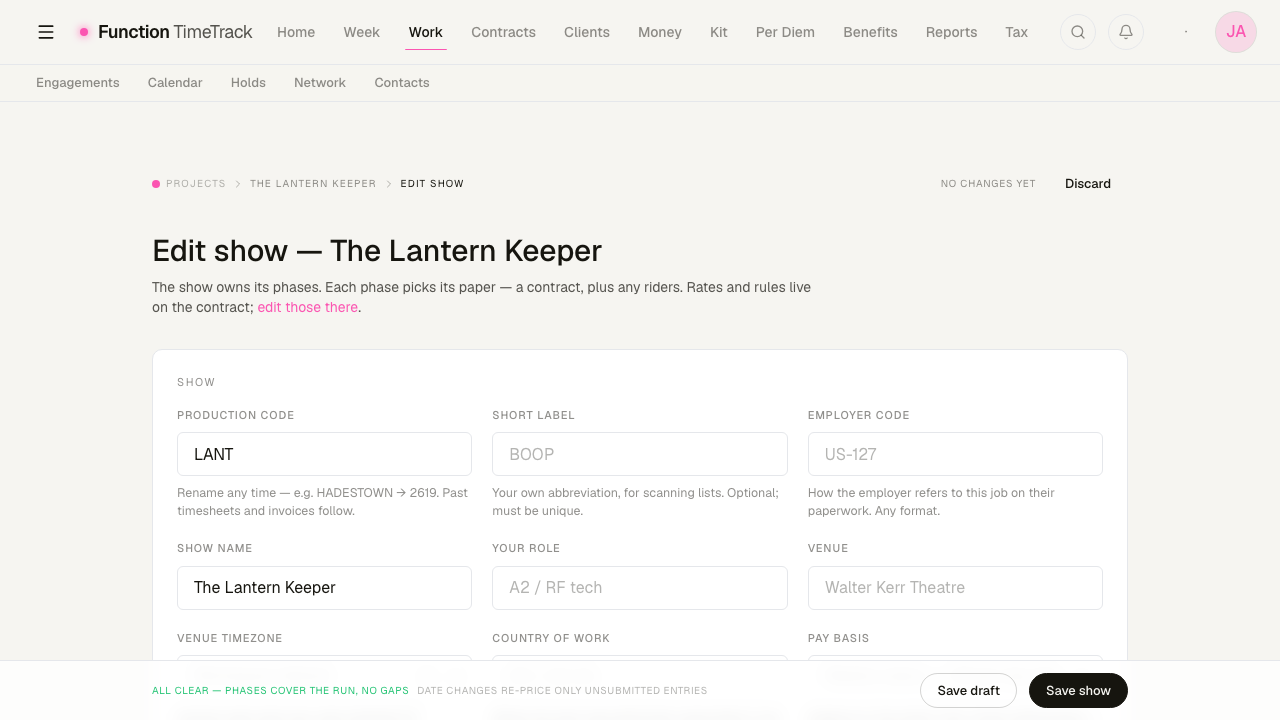
Edit on the masthead opens it. Everything here persists through the same project and phase APIs the rest of the app reads, so a change is live immediately.
The show fields
Production code is your short handle for the show and can be renamed at any time — past timesheets and invoices follow it. Short label is your own abbreviation for scanning lists. Employer code is how the employer refers to this job on their paperwork, in whatever format they use; recording it is what makes their pay stub match your ledger.
Then: show name, your role, venue, venue timezone, country of work, pay basis, and status (Pencil · Active · Wrapped).
A few of the fields repay reading their hint text:
- How this pays — thirds, at milestones, or on completion. Left blank the app assumes weekly, and stops reporting each unpaid week as owed on time.
- Flat engagement fee — the whole deal's agreed fee. It is never split across the show and never prices a week; what a week earned stays whatever the engine computes.
- Production freeze — the day the show stops taking modifications. Sunday calls on or after it pay 1.5×. Leaving freeze status unknown means the Sunday premium is neither paid nor denied — it is flagged for you to rule on, rather than silently decided.
- Employer of record — the company that legally employs and pays you. This takes a payment source, which is often not the company that hired you.
- Weekly guarantee — guaranteed days per week, with a proration basis. Phases inherit it unless they set their own; a phase override always wins. Named-week guarantees cover the weeks that are exceptions.
Lead phase — the spitball
Before a show is confirmed, you can sketch its rhythm in rough terms — "Tech 14h × 6, Previews 12h × 2, Run 8h × 8". When you confirm and convert, that expands into a day-by-day work plan.
Someone took this show
An honest little section for a job you were up for and lost: who got it, when you found out, why if you know, and anything worth remembering. It records competitive history — who is being called ahead of you — and it explicitly is never used as one of your own recommendations. You can fill it in long after the show closed.
The phase timeline
The gantt at the bottom is the heart of the editor. Phases snap to days, with no gaps and no overlaps enforced.
- Click a phase to rename it, set its role, change its dates, or rebind its contract.
- Drag a bar's edges to nudge dates. Each moved phase saves its own dates, sequenced by drag direction so a shared boundary never transiently overlaps.
- The contract lane below shows the show's default contract; any phase can override it.
- The riders lane holds per-show or per-phase overlays — a higher per diem, hotels, local premiums. A rider can be scoped to the whole show or to a single phase; the narrower scope wins.
Under it all: every entry is priced by its day's phase → rider → contract.
What a date change does, and does not, re-price
The save footer says it: date changes re-price only unsubmitted entries. A week you already submitted keeps the money it was submitted with. That is intentional — retroactively moving a submitted week's pay because a phase boundary shifted would silently rewrite history you have already invoiced against.
The planned view
A show still at on hold with nothing tracked gets a different page: projected take, a confidence reading, a blockers checklist of what has to be cleared before it can be confirmed, and a comparison against competing asks you would have to turn down.
The real parts are the show, its sketched phases, the bound contract's rate ladder, and the claimed hold span. The projected take, the confidence percentage, the blockers list and the forfeit comparison are derived or placeholder — the page marks them, and each one names the model it is waiting on. Read them as a prompt, not as a forecast.
Known rough edges
- The command palette's "New Project" goes nowhere useful.
⌘K → New Projectnavigates to/projects/new, which has no page of its own and is caught by the show-detail route as a show with the idnew— so it renders "Could not load this show." New Invoice in the same menu points at/invoices/new, which 404s. Create a show from the Work hub instead. /projectson its own redirects to/work. The productions index folded into the Work hub; only the per-show links are live.
The hold desk
First refusal versus hold, hold rank, release-by dates, the collision screen that shows which engagements want the same days, and the ledger for money that is not worked time.
Work Plans (planned income)
Forecast what a booking will pay before you work it — paint a span on the calendar, price it through the same pay engine as your actuals, then compare the forecast against what the show really paid.