Kit & equipment
Bill your own gear on a show — the equipment catalog, reusable kits, physical inventory units with serials, and the kit fees that turn all of it into money you are owed.
If you bring your own gear to a call, that gear is worth money and the app tracks it in one
place: Kit. Everything lives under /kit, in five tabs that build on each other.
The order matters, because each tab feeds the next:
- Equipment — what kinds of things you own. A wrench roll. A cable caddy. One card per type.
- Inventory — the actual physical units behind those types: serial numbers, condition, where each one is, whether it is available.
- Kits — reusable bundles. "Deck electrics kit" is four pieces of equipment and one daily rate, so you never price it piece by piece again.
- Kit Fees — a kit going out on a show for N days at a rate. This is the part that becomes money.
- Software — subscriptions you can allocate to a show the same way.
One hub, five old addresses
/kit-fees, /kits, /equipment and /inventory still work — they are the original standalone
pages and old bookmarks land on them. Everything on them is also in the Kit hub, in the FM
layout the rest of the app uses, and the Kit nav tab points at /kit. Use the hub; the old
routes are a migration courtesy, not a second product.
Every tab is deep-linkable with ?tab= — /kit?tab=equipment, /kit?tab=inventory, and so on.
A tab only loads its data when it is the active one, so those links are cheap.
Kit fees — the money part
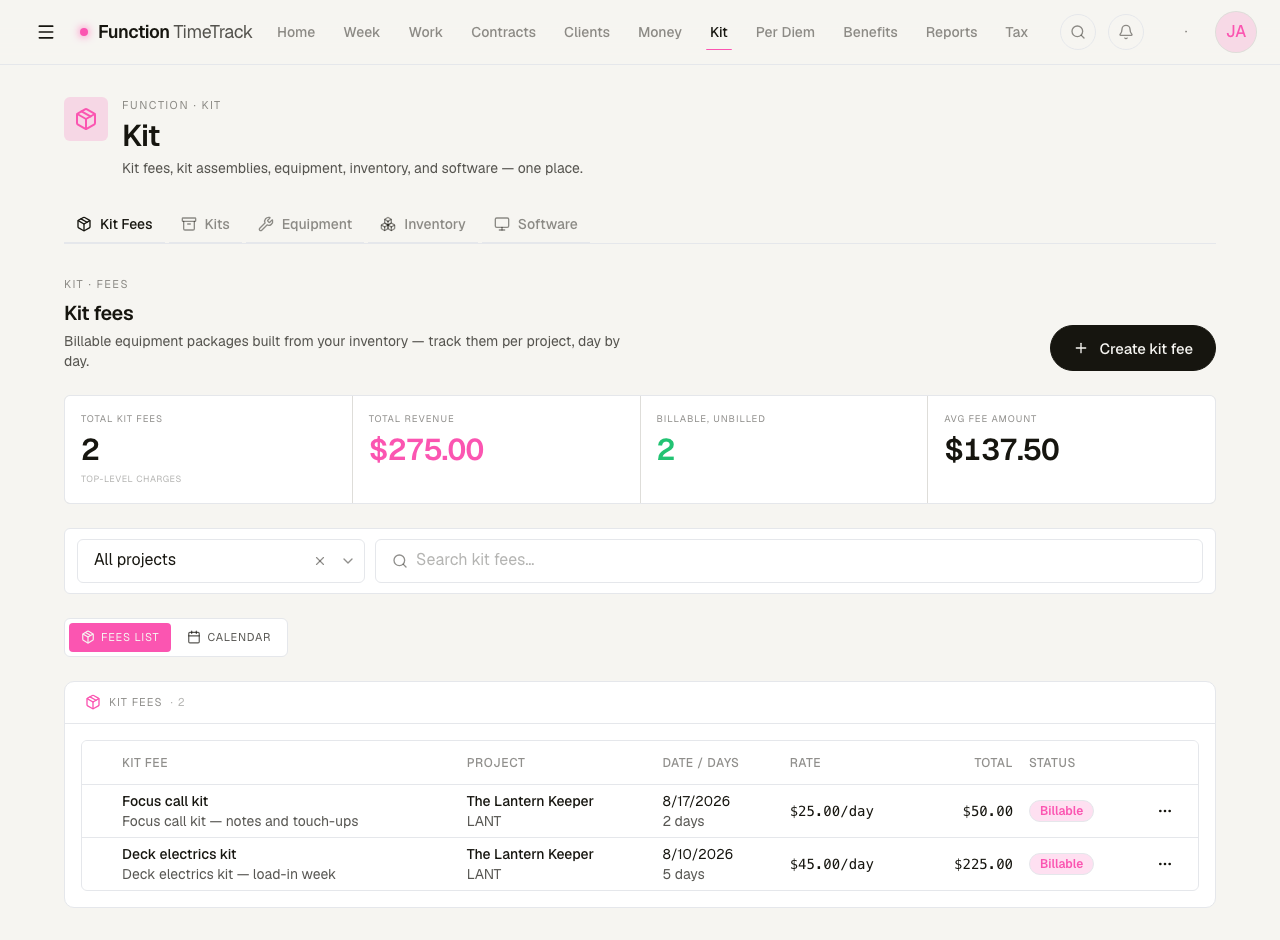
A kit fee is one row saying: this kit, on this show, for this many days, at this rate. The table multiplies it out and totals it.
The four tiles above it read:
| Tile | What it counts |
|---|---|
| Total kit fees | Top-level charges only — see the note on allocations below |
| Total revenue | Days × rate, summed across those charges |
| Billable, unbilled | Charges marked billable that have not landed on an invoice yet |
| Avg fee amount | Total revenue ÷ number of charges |
Why the count says "top-level charges"
A kit fee can be allocated across several weeks — a five-day charge split over two timesheets, for instance. The split produces child rows underneath the parent. The tiles deliberately count only parents, because summing parent and children would report the same money twice.
Creating one
Create kit fee opens a form that wants a show, a date range, and some equipment. You can pick equipment item by item, or add a whole kit — which pulls in every piece in that kit's composition, already priced at each item's daily rate. Then:
- Leave the total blank and the app computes it from the equipment and the number of days.
- Or type a total, and the app back-solves the effective per-day rate from it. That is the honest path when you negotiated a flat number and the itemisation is just paperwork.
- Budget optimizer takes a number you have been told is the ceiling and scales the selected equipment's rates down to fit it. It only acts if you are over — if you are already inside the budget it says so and changes nothing.
The calendar view
The Calendar toggle above the table swaps the list for a day-by-day grid where you mark which kits went out on which days and save the lot in one write. That is the right surface for a run where the kit goes out most days but not all of them; the list is the right surface for one charge covering a block.
Allocating a fee to timesheets
The Allocate action on a row splits one charge across the weeks it actually covers, writing a child row per week with its percentage and amount. Use it when a single kit fee spans a pay period boundary and each week has to carry its own share.
Kits — the bundle you stop re-pricing
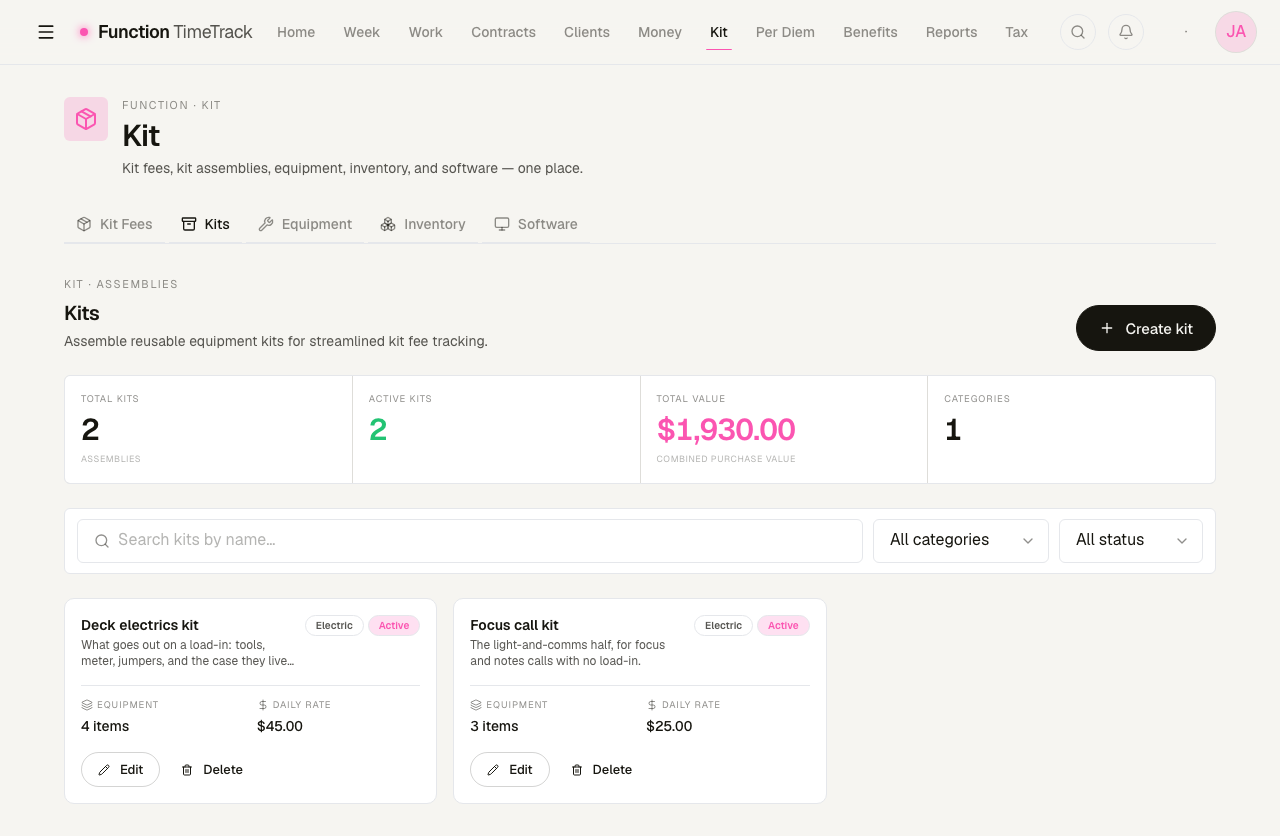
Create a kit, give it a category and a daily rate, and add equipment to it with quantities. From then on, a kit fee can name the kit instead of listing six items.
A kit carries daily, hourly and weekly rates, and a minimum number of days. Rates on the kit are what you charge for the bundle; rates on the equipment are what each piece is worth on its own. They are separate numbers on purpose — a bundle usually prices below the sum of its parts.
Read the Total value tile carefully
Total value is the combined purchase price of the equipment inside your kits, multiplied by quantity. It is a replacement-cost figure — useful for insurance, not a rental total. Two kits renting at $45 and $25 a day showed $1,930.00 there, which is what the gear cost, not what it earns.
Deleting a kit asks first, and cannot be undone.
Equipment — the catalog
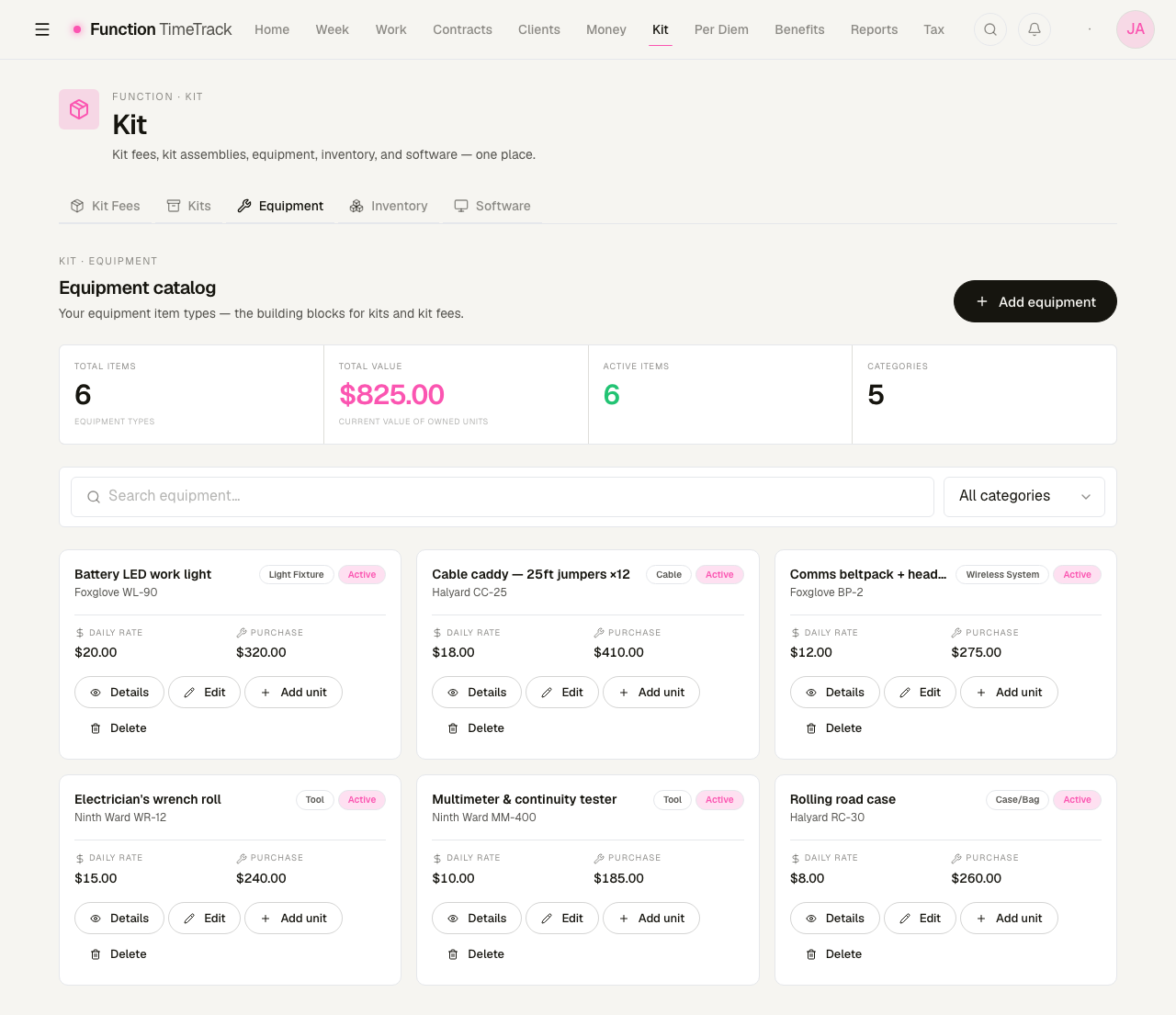
Each card is a type of thing. It carries a category (Tool, Cable, Light Fixture, Case…), an optional brand and model, a daily rental rate, and a purchase price. Twenty-one categories are available, covering camera, lighting, sound, grip, power, computing and safety gear.
Four actions per card:
- Details — the full record, including any units and their depreciation.
- Edit — change the type.
- Add unit — register an actual physical object of this type. This is the bridge to the Inventory tab.
- Delete — asks first.
Total value here means something else again
The Equipment tab's Total value sums the current value of the inventory units you have registered — not the purchase prices printed on the cards. An item type you have never added a unit for contributes nothing to it. In the picture above, six types with $1,690 of purchase prices show $825.00, because that is what the four registered units are currently worth.
Serializable or not
An equipment type is either serializable or not, and the choice decides how inventory works for it:
- Serializable — one inventory unit per physical object, each with its own serial number. A camera body, a meter, a beltpack. This is what makes an insurance claim possible.
- Not serializable — one inventory unit carrying a quantity. Twelve jumpers on a caddy are one
row that says
Qty 12, because nobody serialises cable.
Inventory — the actual objects
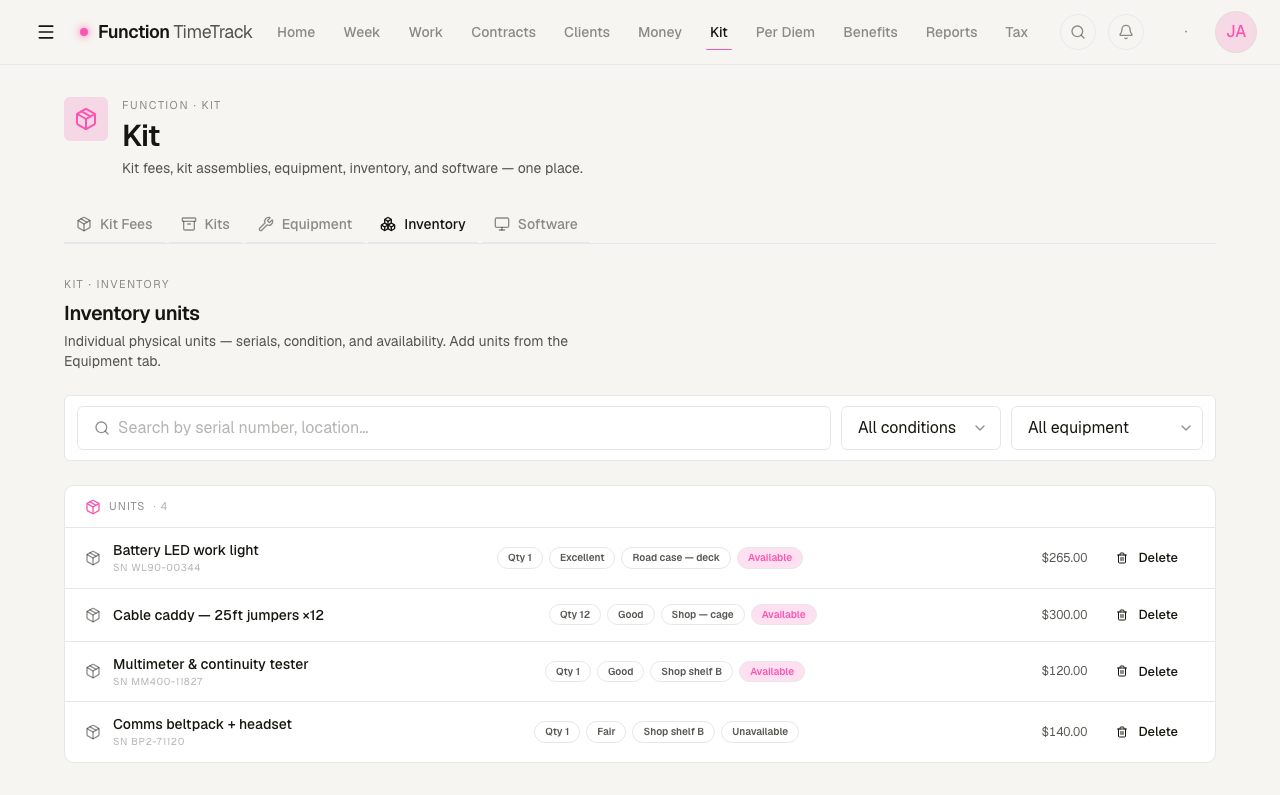
Each row is a physical unit: its serial (where it has one), quantity, condition, where it lives, whether it is currently available, and its current value.
Condition runs Excellent · Good · Fair · Poor · Damaged. The filters at the top search by serial or location, and narrow by condition or by equipment type.
Units are created from the Equipment tab — its Add unit button — and the tab says so. You can delete a unit here.
Each unit can also carry a purchase date, a purchase price, a warranty expiry, and last/next maintenance dates.
Software & licences
The fifth tab has two views of its own — Subscriptions and License Keys — and covers the kit-adjacent costs that are not physical: a yearly subscription, a licence key. A kit composition can name either an equipment item or a software subscription, so a kit fee can bill an editing setup that is partly hardware and partly a licence.
It also has its own address, /software, which is the same screen. The Kit hub's tab and the
standalone route are one page, not two.
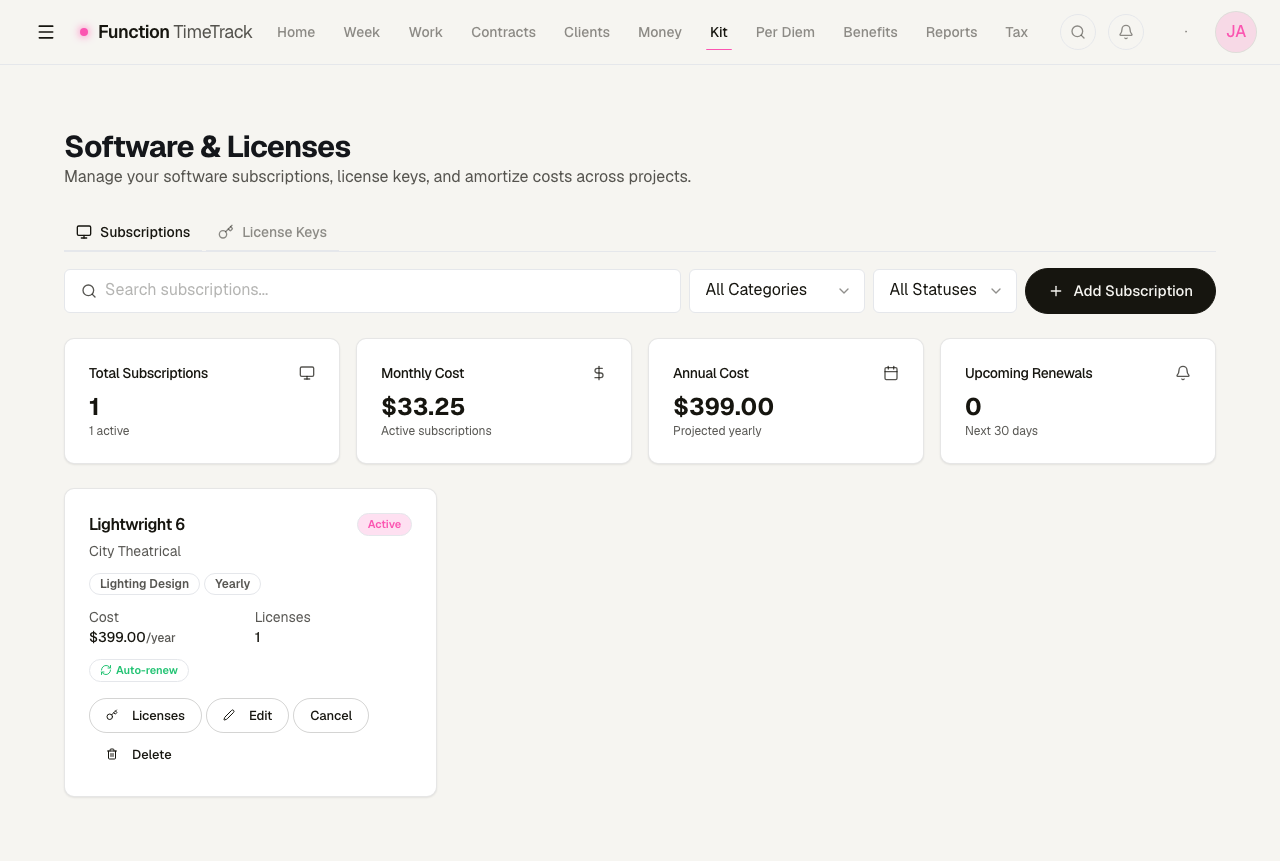
The cost cards
- Total subscriptions and how many are active.
- Monthly cost — every active subscription normalised to a month, so a $399/year licence contributes $33.25 rather than being invisible eleven months of the year.
- Annual cost — the same figure projected out.
- Upcoming renewals — how many fall in the next 30 days.
Adding a subscription
Add Subscription, then: a name and vendor, a category (Design & CAD, Lighting Design, 3D Rendering, Creative Suite, Video & Audio, Project Management, Communication, Accounting, Cloud Storage, Office Suite, Specialized, Other), a billing cycle (monthly, quarterly, yearly, biennial, or a one-time perpetual purchase), the cost per cycle, a licence count, and a purchase date.
The renewal date is calculated from the purchase date and the cycle — a one-time purchase has none, correctly, because it does not renew. A subscription also carries tax deductibility and a business-use percentage, and can be given an annual cost escalation.
Search across the catalogue, and filter by category or status (Active, Cancelled, Expired, Trial, Suspended).
License keys
The second tab lists licence keys across every subscription: the key itself, a seat number, who it is assigned to, and activation and expiry dates.
A key can be shared through a link at /software/licenses/shared/{'{token}'}. That page is
public — it needs no sign-in — and is protected by a password you set when you share it,
with an optional expiry. A recipient sees only the one key, its software name and vendor, and the
assignment details; nothing else in your workspace is reachable from it.
A share link is a password away from a working licence key. Set an expiry, and revoke the link when whoever needed it is done — a revoked link answers "not found or has been revoked" rather than failing silently.
What is not built yet
Maintenance tracking is not wired up. There is a page at /inventory/maintenance with a
Maintenance Records screen, summary tiles and an "Add Record" button — and behind it there is no
API. The page asks for /api/v1/inventory/maintenance, which does not exist, catches the 404, and
renders permanent zeros with a "No maintenance records found" empty state. The Add Record
button sets a flag nothing reads, so it opens nothing.
The nextMaintenance and lastMaintenance fields on an inventory unit are real and do store
dates. Nothing schedules against them yet.
Do not plan around the maintenance page
It is a shell. If you need service history today, keep it in the Notes field on the inventory unit, where it will at least be somewhere you can find it.
Where kit money shows up next
A billable kit fee is money owed to you and flows on from here:
Per diem & travel
How Function Timetrack prices per-diem days — occupancy, high/low geography rules, opt-out caps, and travel-day proration — and how to set up per-diem city rules on a contract.
Expenses
Log what went out, triage the charges your bank sent over, keep the deductible ones separate from the merely work-caused ones — and see which receipts a contract clause says you are owed back.