Clients & payers
Two directories that answer two different questions — who hired you and who you invoice (Customers), and who the money actually comes from (Payment Sources), including how to crosswalk the names a payroll house prints on a cheque stub.
There are two directories in this app that both look like lists of companies, and confusing them is a good way to make your analytics wrong.
- Customers (Clients → Directory) — who you bill. Contact details, billing address, QuickBooks sync. This is the invoicing side.
- Payment Sources (Money → Payment Sources) — who pays you, per phase of a production. Often not the same entity as the one that hired you.
On a small job they are the same company and you can ignore the distinction. On a production that runs through a payroll house, or where a rental phase is billed to one entity and the tech phase to another, the split is the whole point.
Customers — the people you invoice
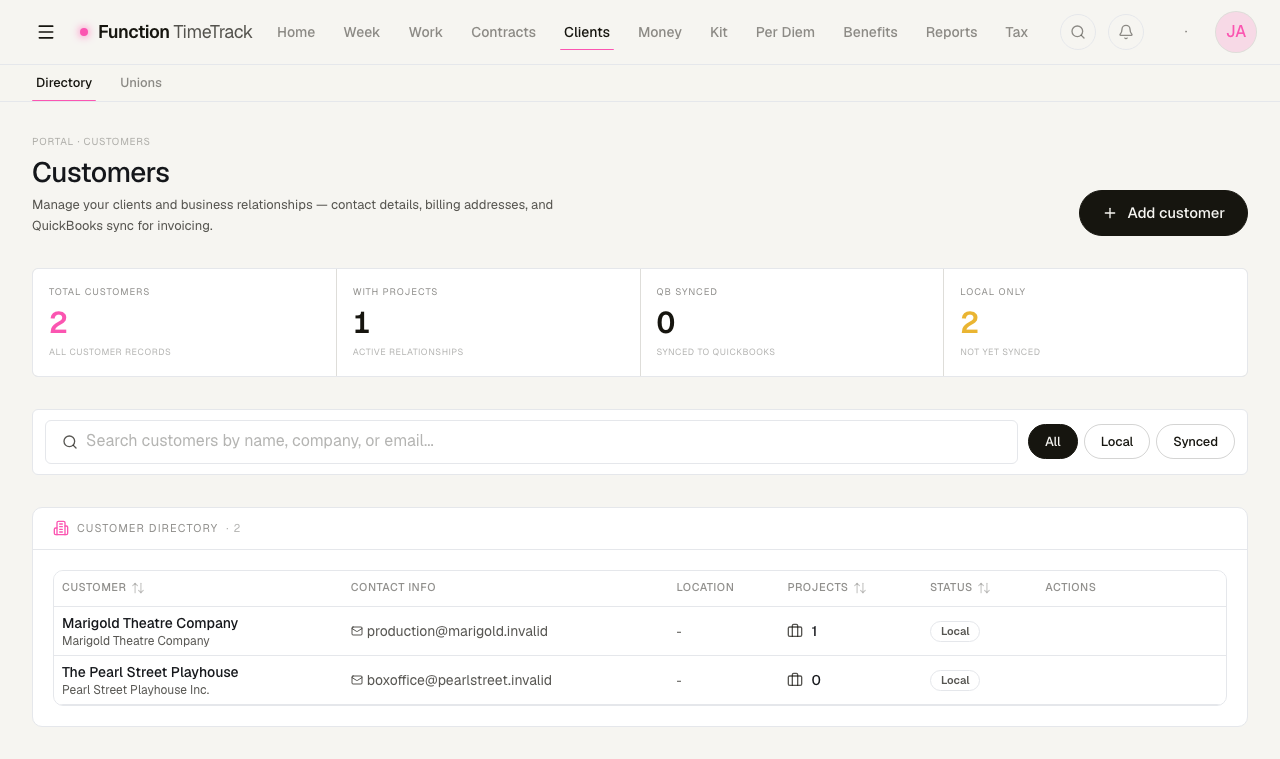
Add customer opens a form with a display name (the only required field), optional first and last name, company name, email, phone, and a billing address with a "same as billing" shortcut for shipping.
The four tiles count total customers, how many have an active project, how many are synced to QuickBooks, and how many are local only.
QuickBooks sync, and the local-first rule
The customer record is shaped to match QuickBooks' own Customer object, so the app works perfectly well with no accounting integration at all and can hand everything over later without a migration.
Each row carries a sync status:
| Badge | Meaning |
|---|---|
| Local | Exists here only. Not an error — it is the default and it is fine |
| Synced | Matched to a QuickBooks customer |
| Pending | Queued to push |
| Sync Error | The last attempt failed |
Two buttons appear in the header only when QuickBooks is actually connected:
- Push unsynced — sends every local-only customer up, with a count badge. It reports partial results honestly: if three of eight fail you are told so, not shown a green tick.
- Import from QuickBooks — pulls their customer list down.
Individual rows can be pushed one at a time from the row menu.
See QuickBooks for connecting the integration.
Unions
The second tab under Clients is the union-locals directory. Locals are not customers — nobody invoices a local — but they belong in the same part of the app because they are the other organisation your work is attached to. See Benefits & union funds.
Payment Sources — who the money comes from
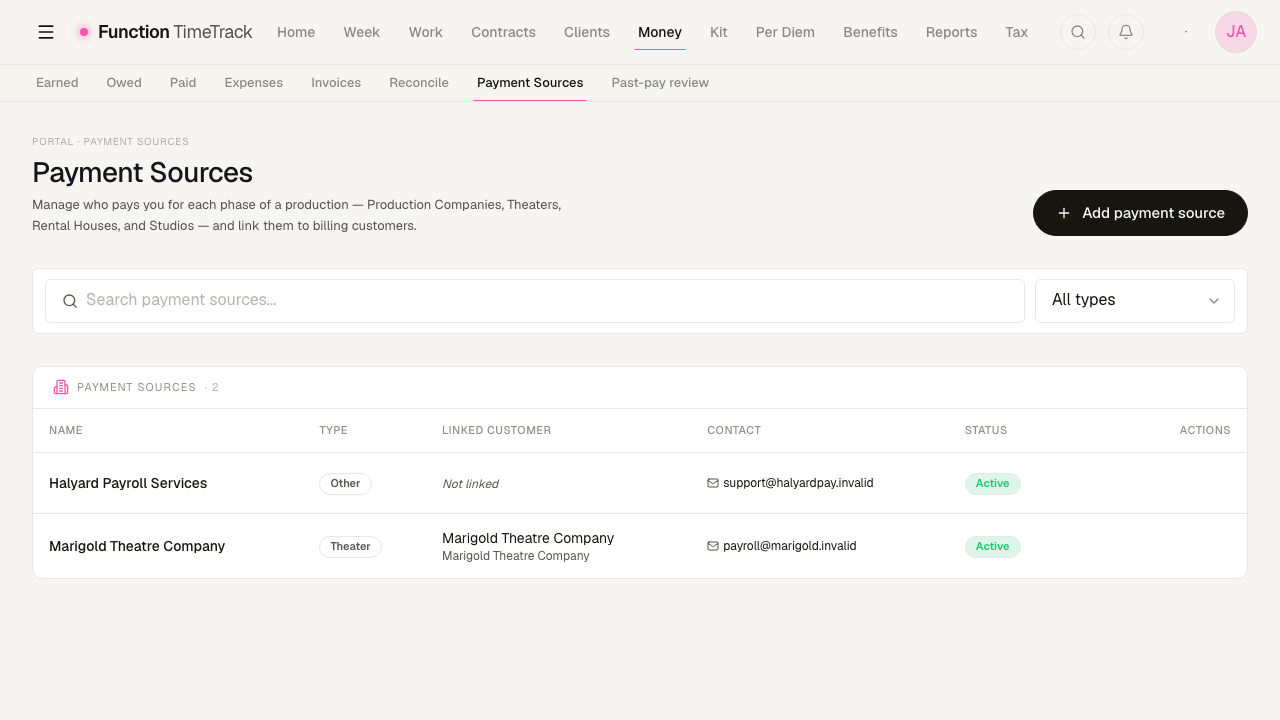
A payment source is typed as a Production Company, Theater, Rental House, Studio or Other, and can optionally be linked to a customer — which is how the two directories join up when the payer and the client are the same company.
Each source holds contact details, an address, a tax ID, payment terms ("Net 30"), and a default payment method.
A payment source can be attached to a whole project or to a single phase of one, which is how a production that pays its rental period through one entity and its run through another gets priced and reconciled correctly.
Payer aliases — the crosswalk that stops names being guessed at
The alias button on a row (the chain-link icon) is the most useful thing on this page and the least obvious.
A payroll house prints itself one way on a cheque stub, another way on a fund statement, and a third way in an import file. Those are not typos — they are different systems with different conventions, and fuzzy-matching them is how one payer silently becomes two, or two silently become one.
So each external name gets an explicit, human-approved link to the canonical payment source:
- Source type — where the label came from:
PAYROLL,FUND_STATEMENT,IMPORT,LEGACY_PROJECT, orOTHER. Each namespace keeps its own labels; a payroll spelling never collides with a fund-statement one. - Source label — the name exactly as it arrived, capitals and abbreviations intact. The field says so, and it matters: the whole point is to record what the other system actually printed.
- Notes — why you made the link, for the version of you reading this in a year.
In the demo data, HALYARD PAYROLL SVCS LLC is an alias for the payment source Halyard Payroll
Services. A deposit arriving under the shouty version resolves to the right payer without anything
being merged or renamed.
Nothing is matched automatically
Aliases are reviewed by hand, by design. Analytics must never fuzzy-merge payroll, fund-statement, imported and legacy labels — one wrong merge quietly moves money between employers in every report downstream, and it is very hard to notice afterwards.
Editing and deleting
Edit opens the same form as Add payment source. Delete asks for confirmation. A source still attached to projects, phases or income entries should be marked Inactive rather than deleted — inactive sources drop out of pickers but stay attached to the history that references them.
Which one do I put on a show?
On the show editor there is an Employer of record field. That takes a payment source — the company that legally employs and pays you on that show. The customer is who you invoice. When you work directly for a producer they are the same organisation and you link the two records together; when you are payrolled they are not, and keeping them apart is what makes your income reconcile.
Invoicing
Create invoices from your timesheets, track them from draft to paid, record partial payments, and share or export a PDF.
Reports & exports
Read back your year — profitability, rate realization, earnings and withholding, union funds, per-production breakdowns, penalty compliance, and PDF documents — all from the Reports hub.