Contracts & rate configuration
Create a contract, set its pay basis and rules, and layer on premiums, per-diem, touring levels, deductions, and effective-dated revisions.
Your contract is the structured version of the deal you're working under — the rate, the overtime rules, the penalties, the premiums, the per-diem, and the fund contributions. Once it's set up, the pay engine reads it to price every week you log. This page walks through building and maintaining a contract from scratch, section by section.
If you just want the mental model of how the pieces price a week, read Contracts & the pay engine first. This page is the hands-on "where do I click, and what does each field do" guide.
One contract, many shows
A contract is reusable. Point several productions at the same contract as their default, and each one inherits its rates and rules. Per-show differences are handled with riders (covered below), not by rebuilding the contract.
Create a contract
Contracts live in the Contracts hub. From there you create a new one and then flesh it out on its edit screen.
- Open the Contracts hub and click New contract.
- Fill in the essentials:
- Contract name — a human label you'll recognize, e.g.
IATSE Local 1 — Stagehand. - Code — a short unique code (up to 20 characters), e.g.
IA1-SH. Codes must be unique; if you reuse one you'll get an error and can correct it. - Rate type — Daily, Hourly, or Flat rate. This is the pay basis; you can change it later.
- Employment — W-2 employee or 1099 contractor.
- Base rate — per hour, per day, or the flat total, depending on the rate type.
- Contract name — a human label you'll recognize, e.g.
- Click Create contract. You land directly on the contract's edit screen.
Sensible defaults are seeded for you
The create dialog only asks for the essentials. Behind the scenes it seeds priceable defaults (standard 8-hour day, OT after 8, DT after 12, 8-hour minimum call, minute-level time rounding) so the engine can price the contract immediately. You refine all of these on the edit screen.
The edit screen at a glance
The contract editor (/contracts/[id]) is a long two-column page. The left column is the deal,
top to bottom: parties, the rate ladder, and every rule and premium layer. The right column is
your live conscience:
- Reads back as — a plain-English paragraph of the deal, regenerated live as you type. Read it back to yourself; if it doesn't match your paper, something's off.
- What changes vs Rev N — a field-level diff against the current signed revision, so you can see exactly what a save will change.
- Version history — the numbered ladder of revisions, with roll-back.
At the bottom, a fixed footer shows open questions (fields still unset that the engine cares about), a saved-state indicator, and the two save buttons.
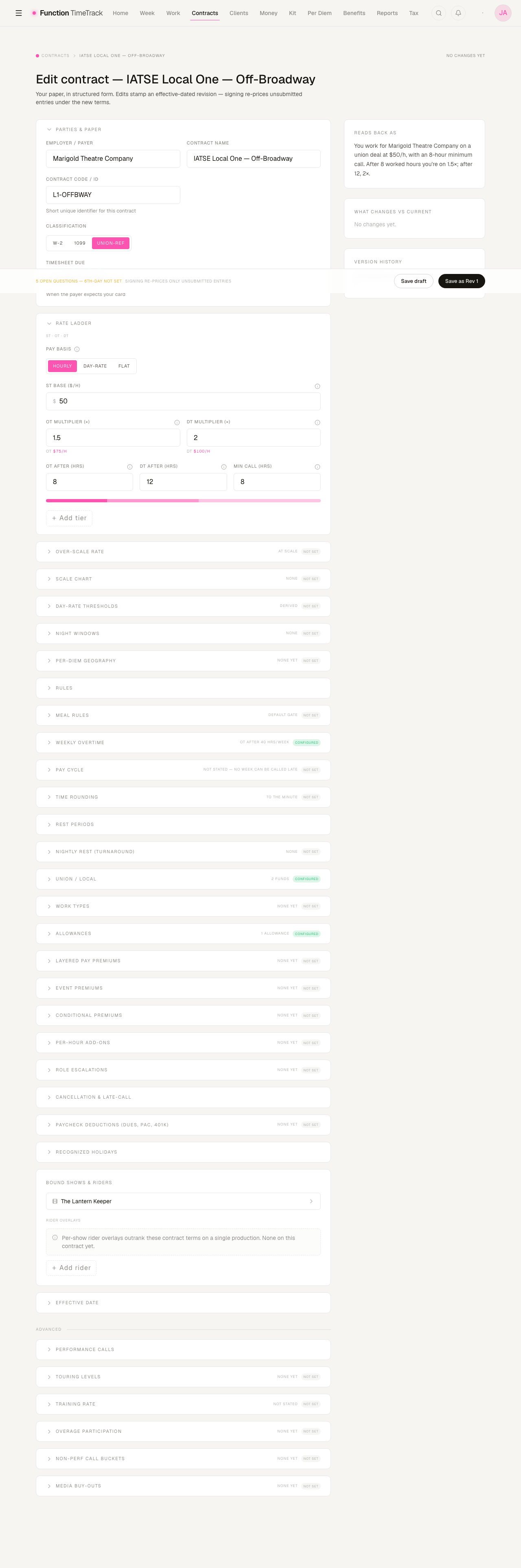
Two kinds of section — and it matters for saving
Some sections (Parties, Rate ladder, Rules, Effective date) are part of the main contract form — their changes are staged and only persist when you hit a save button in the footer. Most other sections (Touring levels, Per-diem geography, Allowances, all the premium sections, deductions, holidays, funds) save themselves independently — each row has its own Add/Save/Remove button that writes immediately. Watch for the per-row Save button: if it's there, that section persists on its own.
Parties & paper
The top section records who you work for and how you're classified.
- Employer / payer — who actually cuts the check.
- Contract name — the display name (same one from creation; editable here).
- Classification — W-2, 1099, or Union-ref. This maps to your employment type and union flag.
- Timesheet due — a free-text reminder of when the payer expects your card, e.g.
Monday 10am.
The rate ladder
This is the money foundation. The Pay basis toggle at the top switches the whole entry surface, so the fields match how you're actually paid.
Hourly
- ST base ($/h) — your straight-time hourly rate before any overtime, premium, or penalty.
- OT multiplier / DT multiplier — overtime and double-time as multiples of the base (1.5× = time-and-a-half, 2× = double). The screen shows the resulting dollar rate live beneath each multiplier.
- OT after / DT after (hrs) — the daily thresholds where straight time becomes OT, then DT.
- Min call (hrs) — hours you're guaranteed even if released early.
Day-rate
- Day rate ($/day) — the flat amount paid per day worked.
- Guaranteed min call (hrs) — the hours the day rate covers. The screen derives an implied hourly ($/day ÷ guarantee) so you can sanity-check it.
- Beyond the guarantee — the rule for extra hours:
- Straight — extra hours pay straight time until the daily OT threshold (which you then set).
- Immediate OT — overtime the moment you pass the guarantee.
- Absorbed — the flat day rate covers the whole day; overtime only accrues weekly.
Flat
- Flat amount ($) — one lump sum, never run through per-hour math.
- Billing period — Week, Project, or Phase.
A day rate is not a separate pay type
"$X/day" is expressed as a rate plus a minimum-call guarantee plus a beyond-the-guarantee rule. That one model handles flat-for-the-day, guaranteed-then-OT, and true hourly. Pick the Beyond the guarantee rule that matches your paper — it's the difference between overtime kicking in mid-day and never kicking in daily at all.
Rate tiers
Below the ladder (for Hourly and Day-rate contracts) you can add rate tiers — named classifications with their own base hourly rate. Click Add tier, give it a name, code, and rate. Existing tiers show as chips. A Default tier is created automatically. Flat contracts have no per-hour tiers.
Save the contract before adding tiers
Rate tiers, touring levels, premiums, and most other add-on rows attach to a saved contract. On a brand-new contract these Add buttons stay disabled until the contract exists — which it does the moment you create it, so this only bites during the create-preview.
Rules
The Rules section holds the penalty and premium-day rules the engine checks against the reality you log. Every field here treats blank or 0 as "not set" — a cleared penalty persists as nothing, so the engine never fires a $0 penalty as though it were configured.
- Meal — Break by (hrs) is the gate, Penalty (×) is the multiple charged for a missed meal, Break length (min) is the minimum unpaid meal that satisfies the obligation.
- Turnaround — Minimum (hrs) of rest between calls, a Multiplier, and a Mode that chooses how the penalty is computed (invaded-hours premium, pay-the-gap, straight-time multiple, or a flat fee). Multiplier modes also let you pick the Rate basis (prevailing vs straight time); flat-fee mode shows a dollar field instead.
- Travel & per-diem — a Travel rate and a Per-diem base. (A show rider can outrank the per-diem base.)
- Kit — a Kit fee for equipment, per day or per project.
- Premium days — 6th-day and 7th-day multipliers for consecutive worked days.
Meal gating: set BOTH the penalty and the break-by
The meal penalty is gated — it only fires when worked hours pass the break-by threshold and no qualifying meal or walk-away was logged. The section shows a live status pill: Active (both a penalty rate and a break-by are set), Needs break-by (you set a penalty but no threshold, so it will never fire), or nothing when it's simply not set. If you want the penalty to work, both fields must be filled.
Touring levels
For touring contracts, a single agreement can carry multiple levels (Full / L1, L2, Modified / L3, SET / L4), each with its own wage floor, per-diem, and effective window. An engagement books at one level on the show, and the engine overlays that level's schedule first.
To add a level: click Add touring level, then set a Code and Label (both required). Every wage field below is optional — leave one blank to inherit the base contract. You can set base/weekly rate, min call, OT/DT multipliers and thresholds, a benefits-basis rate, single/double per-diem, opt-out caps, an optional travel-day proration bracket, and an effective start/end window. Mark one level Default, and use Sunsetting + Continuation allowed for time-boxed levels.
Zero levels means nothing changes
A contract with no touring levels is just a single-level contract — pricing is unchanged. Levels are purely additive; you only need them for genuinely multi-tier touring deals.
Per-diem geography
Per-diem defaults to the Low tier. Add a city rule to promote specific cities to High:
- Click Add city rule.
- Enter a City key (e.g.
US-NY-NYC) and optional region. - Pick the Tier (High / Low) and a Trigger:
- Always — the city is always at this tier.
- < weeks — conditional, gated by engagement length (e.g. High only when the run is under 4 weeks). Enter the week threshold.
- Optionally tag a Source (a catalog/contract citation) for provenance.
Geography narrows only the opt-out cap
The single/double per-diem rates are flat and live on the touring level — geography does not change them. What a High/Low rule adjusts is the opt-out cap. Zero city rules = flat per-diem with no geography, and pricing is identical.
Union / Local & fund contributions
Relate the contract to its Union Local. Pick a Local from the dropdown and its benefit funds appear beneath it; tune each fund's per-contract contribution (method — including 401(k) employee elective — amount, and an optional in-gross override). Manage the Locals and their funds themselves over in the Union Locals area. See Benefits & union funds for how the funds are calculated from your gross.
Work types
A single call can be different kinds of work — a Gaffer day vs a Shop-Prep day — that carry
different rules. Add a work type with a label (e.g. SHOW_CALL), and give it optional overrides
that layer over the contract default: minimum call, base rate, OT/DT multipliers, and OT/DT
thresholds. Leave any field blank to inherit.
What applies today vs what's staged
The per-work-type minimum call is applied in pay today — and when it lifts a line, the week
grid names both numbers (WORK_CALL 4H → 8H MIN) rather than asserting hours you didn't work. A
work type that carries its own hourly rate also prices in pay today: tagging a block with that
work type prices those hours at the work type's rate. The OT/DT multiplier and threshold
overrides are stored and shown here, but their pricing is a gated follow-up — set them now so
they're captured.
Premiums and add-ons
Contracts price extra pay in several distinct shapes. Each is its own section, and each row saves itself. Here's when to reach for which.
Layered pay premiums
The Layered pay premiums section owns two things:
- The contract-level basis and stacking policy — the OT basis, the DT basis, and premium stacking: Multiply (premiums compound), Add (marginal parts summed), or Highest wins (compare what each premium would actually pay, and keep the biggest). Get this one right: it is the difference between a Sunday-into-overtime day paying a product and paying a single greatest rate, and many agreements state explicitly that premiums do not compound.
- Rate premium rows — triggered by a day type, a work type, or a classification.
Event premiums
Fire on an event code (e.g. HOLIDAY_WORKED, PERFORMANCE, PYRO), regardless of hours. Two
shapes:
- Fraction of weekly — pays a fraction of the weekly rate per event (e.g. +1/6 for a holiday worked). Optionally gate it to occurrences beyond N per period.
- Fixed per event — a flat dollar amount per occurrence (e.g. a per-performance pyro fee).
Trigger codes are UPPER_SNAKE_CASE. Mark a premium Mandatory if it always applies. See
Event tagging for how events get onto a day.
Conditional (context) premiums
Fire when a per-day predicate matches — any of: context tags, day flags, a work type, or an event type (at least one condition is required). Pay one of:
- Flat $/day — a fixed amount per matching day (e.g. a dark-day stipend).
- $/hour — per worked hour on the matching day.
- Multiplier — a target multiple applied as an additive uplift (1.5 = time-and-a-half).
Per-hour add-ons
A flat $/hr added to every worked hour — a standing scenic bump or hazard add. Optionally gate it by a tag or work type, or floor it to a minimum number of hours. Leave the predicate blank to apply to every hour.
Role escalations
Extra pay when a day is worked in an escalated role (e.g. a Best Boy stepping up to Gaffer). Name the role and pick exactly one shape: a percent uplift on the resolved hourly (10 = +10%) or a flat $/hr bump.
Which premium shape do I use?
Rough guide: Event premium when something happened (a performance, a holiday, pyro). Per-hour add-on for a standing bump on every hour. Conditional premium for a per-day condition (a tag, day flag, or work type). Role escalation specifically for stepping up into a higher role.
Cancellation & late-call
A single per-contract config covering two guarantees:
- Cancelled call — hours or a flat amount guaranteed when a booked call is cancelled.
- Late call — a penalty (hours or flat) when a call is pushed or starts late.
Either side can set an hours guarantee, a flat amount, or both — the engine takes the greater at price time. There's one config per contract, so this section edits the single row in place.
Below-the-line deductions
Deductions taken from the paycheck after pay is computed. Add a row and pick:
- Type — Dues, PAC, 401(k), or Other.
- Basis — % of gross, a flat $ per period, or $ per worked day.
- Tax treatment — Post-tax (reduces take-home only) or Pre-tax. Choosing 401(k) flips it to pre-tax automatically.
Pre-tax vs post-tax
Post-tax deductions (dues, PAC) reduce your net take-home only. A pre-tax 401(k) also lowers your federal and state taxable income — but stays FICA-taxed. The withholding card prices all of these in the gross-to-net waterfall.
The rest of the editor, section by section
The editor carries more sections than most deals need. Everything below is optional — an empty section changes nothing about pricing — but each one exists because some real agreement says it, and leaving it blank means the engine can't honour that clause.
| Section | What it's for |
|---|---|
| Negotiated rate | Your actual over-scale rate, with the floors and ceiling around it. This sits at the top of the rate waterfall: set here, it beats the base rate. |
| Scale chart (dated wage bands) | The agreement's own dated scale steps. Feeds the over-scale margin the Negotiation report quotes. |
| Daily thresholds | The day-rate overtime and double-time seams, and where the premium day starts — the day-rate siblings of the hourly ladder's OT/DT-after fields. |
| Night windows | Clock-of-day premium windows: "1.5× for all work between midnight and 8am," regardless of how long the call has run. Not an overtime threshold — a call that goes in at 18:30 and out at 03:30 triggers no daily OT at all, yet the small hours are still owed. |
| Meal rules | What a meal penalty is worth: the penalty multiplier, and the ceiling on it when the penalty itself lands in overtime. (Distinct from the Rules section's meal gate.) |
| Weekly overtime | Whether weekly OT applies, the weekly threshold, and which hours count toward it. |
| Pay cycle | Which day of the week the cheque is due — the only place that fact is recorded. |
| Time rounding | Log to the minute, bill at a configurable increment. This is a contract term, not a display preference: a contract billing in quarter hours and one billing to the minute pay different money for the same call. |
| Rest periods | The period-scoped "day of rest" obligation — per week, per month, or a rolling window — with a penalty per missed rest. |
| Nightly rest (turnaround) | The nightly turnaround obligation, separate from the Rules section's turnaround penalty. |
| Performance calls | Perf-call structure: an over-length premium on the overage past N hours, plus pre-curtain and performance-time validators. |
| Training rate | A reduced rate for shadowing or learning a track, capped at a number of performances. |
| Allowances | Per-diem, kit-rental, cab, and travel-reimbursement deal terms, each with a provenance badge and an "overrides base" marker where a rider wins. |
Structural extras
A few sections cover less-common but real touring/production terms:
- Overage participation — a percent share of box-office overage (receipts beyond a recoupment baseline). The overage figure itself is supplied at pay time.
- Non-perf call buckets — a weekly allowance of non-performance call hours (rehearsals, load-ins, tech). Matching hours beyond the bucket price at a flat $/hr or a ×base multiplier.
- Media buy-outs — a one-off flat fee for a media/special call (broadcast buy-out, promo shoot). Choose Once per engagement (a single lump sum) or Per event (× matching occurrences).
Leave these empty if they don't apply — empty sections don't affect pricing.
Recognized holidays
Assign the contract's recognized holidays. On a matching calendar date, the engine automatically applies the holiday multiplier — the per-contract override if you set one, otherwise the holiday's default. Use Manage to create holidays and add or remove them from this contract. You don't tag holidays by hand; the calendar does it.
Each holiday also carries a Weekend Observation setting for agreements that move a holiday off a weekend:
- (empty) — no shift; the holiday is observed on the day it falls. This is the default and what every unconfigured holiday keeps doing.
- Sat → previous Fri, Sun → following Mon
- Sun → following Mon (Sat stays)
- Sat & Sun → following Mon
The form previews the resolved date as you change the setting, so you can check it against the clause before saving.
Bound shows & riders
This section lists the shows whose default contract is this one (each links to its production), and the contract's riders.
A rider is an overlay of additional or override terms for a single production — the way a real deal memo amends a standard agreement. Rider terms outrank the base contract for that one show.
To add a rider (you need at least one bound show):
- Click Add rider.
- Choose the show it applies to.
- Enter the override terms (e.g. per-diem, hotel per night, base rate) and an optional label, note, and effective window.
- Save. The rider appears in the list; remove it with the × button.
Effective dates, saving & revisions
Every save stamps an effective-dated revision — a point-in-time snapshot of the whole deal. This is how the contract stays honest over a run: a mid-tour bump becomes Rev 3 effective a specific Monday, and the earlier weeks keep pricing under Rev 2.
Set the effective date
In the Effective date section, choose when the revision you're about to save takes effect:
- Backdate — a past date (re-prices unsubmitted entries back to there).
- From date — any date you pick.
- Next week — the next Monday, computed and shown read-only.
The section echoes the exact date your save will stamp.
Save
Two buttons in the fixed footer:
- Save draft — stamps a DRAFT revision. Nothing is re-priced.
- Save as Rev N — stamps a SIGNED revision. Signing re-prices only unsubmitted entries under the new terms; anything already submitted is left alone.
The footer also surfaces open questions — a count of fields the engine cares about that are still unset — so you can tell at a glance whether the contract is fully specified before signing.
Review changes before you sign
Before hitting Save as Rev N, glance at the right column:
- Reads back as — does the plain-English paragraph match your paper?
- What changes vs Rev N — the field-level diff of exactly what this save alters, old value → new value.
Version history & roll-back
The Version history panel lists every revision newest-first, each with its number, status (DRAFT / SIGNED / SUPERSEDED), and effective date. The current one is marked ◉ Current. Any non-current SIGNED or SUPERSEDED revision offers Roll back, which creates a new draft that restores that revision's terms — a safe, non-destructive undo (it adds a revision rather than deleting history).
Signing is what re-prices your weeks
A draft save changes nothing about your existing pay. Only Save as Rev N (a signed revision) re-prices — and only entries you haven't submitted yet. If you're fixing a contract mid-run, mind the effective date and the "unsubmitted only" rule so you don't expect already-submitted weeks to move.
Tips & gotchas
- Blank means "not set," not "zero." Across the Rules and override sections, a cleared or zeroed field persists as nothing — the engine won't fire a $0 penalty or a 0× premium. To turn a rule off, clear it; to set it to a real value, type the value.
- Meal penalties need both halves. A penalty rate with no break-by threshold never fires. Watch for the Active status pill.
- Per-row Save buttons persist immediately. Touring levels, premiums, deductions, per-diem rules, funds, holidays, and riders each save on their own row — you do not need the footer's save for those. The footer save is for the parties/rate/rules/effective-date form.
- Trigger and match codes are UPPER_SNAKE_CASE. Event and context codes normalize to caps; keep them consistent so events tagged on a day line up with the premium's trigger.
- Read it back. The "Reads back as" paragraph is the fastest sanity check that the structured contract matches the paper deal.
- Set the effective date deliberately on any mid-run change, and remember signing only touches unsubmitted entries.
Related
- Contracts & the pay engine — how the layers price a week.
- Event tagging — how premiums get triggered on a day.
- Benefits & union funds — how fund contributions come off your gross.