How pay is calculated (gross → net)
Follow a week of work from logged hours all the way to take-home — how the engine builds your gross, and how withholding turns it into net.
Two things stand between the hours you work and the money you keep: the pay engine, which builds your gross, and withholding, which turns that gross into net (your take-home). This page walks the whole path, in plain terms, so the numbers you see in the app make sense — and so you can spot when a real paycheck doesn't match.
What this page is (and isn't)
This is a conceptual guide for understanding your own numbers, not tax advice and not a spec of the
internal math. Every dollar figure here is a placeholder ($X), and every rate is illustrative.
Your real numbers come from your contract and your tax settings.
The two halves of the story
Think of it as a pipeline with a clear midpoint:
- Gross build-up — the pay engine reads your contract and your logged week, classifies the hours, stacks on premiums and penalties, and produces your gross pay for the period.
- Gross → net — withholding takes that gross and subtracts federal, state, and local tax, payroll tax (FICA or self-employment tax), and any below-the-line deductions, leaving your net.
The rest of this page follows that order.
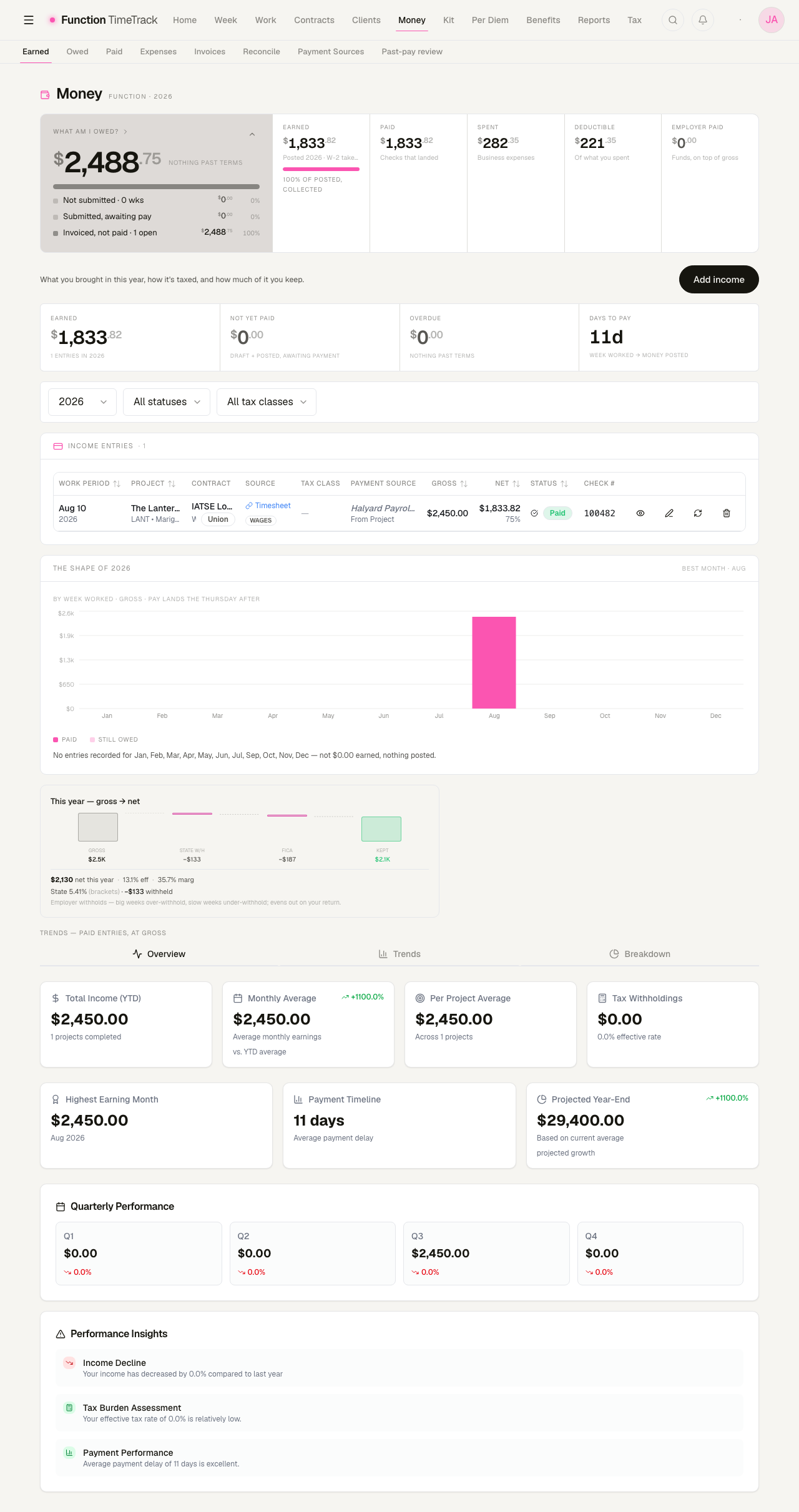
The numbers in this guide
Every figure you see here belongs to a demo workspace for a fictional Local One electrician. The week behind them is the one in Logging time: five days, 46 hours, 40 straight and 6 overtime, on a $50/h contract. The arithmetic is real; the person is not.
Part 1 — How your gross is built
The guiding principle of the engine is: you log what actually happened, and the engine works out what it's worth. You never label hours as straight time, overtime, or double time yourself. You record real calls, travel, and meal breaks; the engine derives the rest from your contract's rules.
For the full picture of contracts, work types, riders, and premiums, see Contracts & the pay engine. Here's the short version of how a gross is assembled.
Step 1: Classify the hours (ST / OT / DT)
The engine takes each day's worked and travel time and splits it into three buckets:
- Straight time (ST) — normal-rate hours.
- Overtime (OT) — hours past your contract's daily threshold (after 8, 10, or 12 hours, depending on the deal) or past the weekly threshold (typically 40).
- Double time (DT) — hours past the next, higher threshold, where your contract defines one.
Because you logged real start/end times and your meal breaks, the engine can draw these lines consistently. Hours are logged to the minute but billed at your contract's rounding increment — so an odd minute here or there gets rounded the way your agreement specifies, not silently dropped.
Day rates still classify by the hour
A "day rate" isn't a flat lump that ignores hours. In the engine it's an hourly rate plus a minimum-call guarantee and a rule for what happens beyond the minimum (straight time, immediate overtime, or absorbed into the day). So even on a day-rate deal you'll see the guarantee honored and extra hours handled per your contract.
Step 2: Price each stretch with premiums
Once hours are classified, each stretch gets a dollar value. Premiums are adjustments stacked on top of base pay. Whether they compound is a term of your contract — its stacking policy is one of multiply (a Sunday worked into overtime layers both multipliers), add (the marginal parts are summed), or highest wins (the premium that would pay the most applies alone, which is what an agreement means when it says premiums "may not be compounded"). The day's work type (rehearsal vs. performance, for instance) also selects the rate and premiums that apply.
Where an agreement's ladder runs past double time, extended-hour rungs carry the upper steps — and they distinguish hours worked from hours elapsed since you reported (meals included), because those are different quantities and a long meal break makes them diverge. See Contracts & the pay engine for the detail.
Step 3: Add penalties
The engine checks your logged breaks and gaps against your contract's penalty rules — meal penalties, turnaround (short rest between calls), minimum-call shortfalls, and sixth/seventh consecutive day rules. Anything triggered is added to the gross.
Step 4: Add event premiums and holidays
Some money is owed because an event happened, regardless of hours — a flat per-performance fee, or a fraction-of-weekly holiday premium. Holidays on your contract's calendar fire automatically; other events (like a pyro or costume fee) you tag by hand. See Event tagging.
Step 5: Fold in allowances — and mind the taxable line
This is the step that most affects your later net, so it's worth understanding:
- Taxable allowances (certain credits treated as income) fold above the line — they add to your taxable gross.
- Vacation paid into gross (where your contract does that) is likewise above the line, and it appears as its own named line in the week's composition rather than as an unexplained part of the total.
- Kit fees are taxable and stay inside the taxed gross.
- Non-taxable reimbursements (per diem, expense repayments) stay outside your taxable gross. They're money you keep, but they are not taxed and do not inflate the base that withholding is calculated against.
Gotcha: your paystub 'gross' and the engine 'gross' can differ
The engine's grossPay is your worked/earned pay. A paystub's gross may bundle in items that
live elsewhere in this model (like in-gross fund credits). When you reconcile a real check, compare
like-for-like — a mismatch here is usually a definition difference, not an error. See
Benefits & union funds for how funds relate to gross.
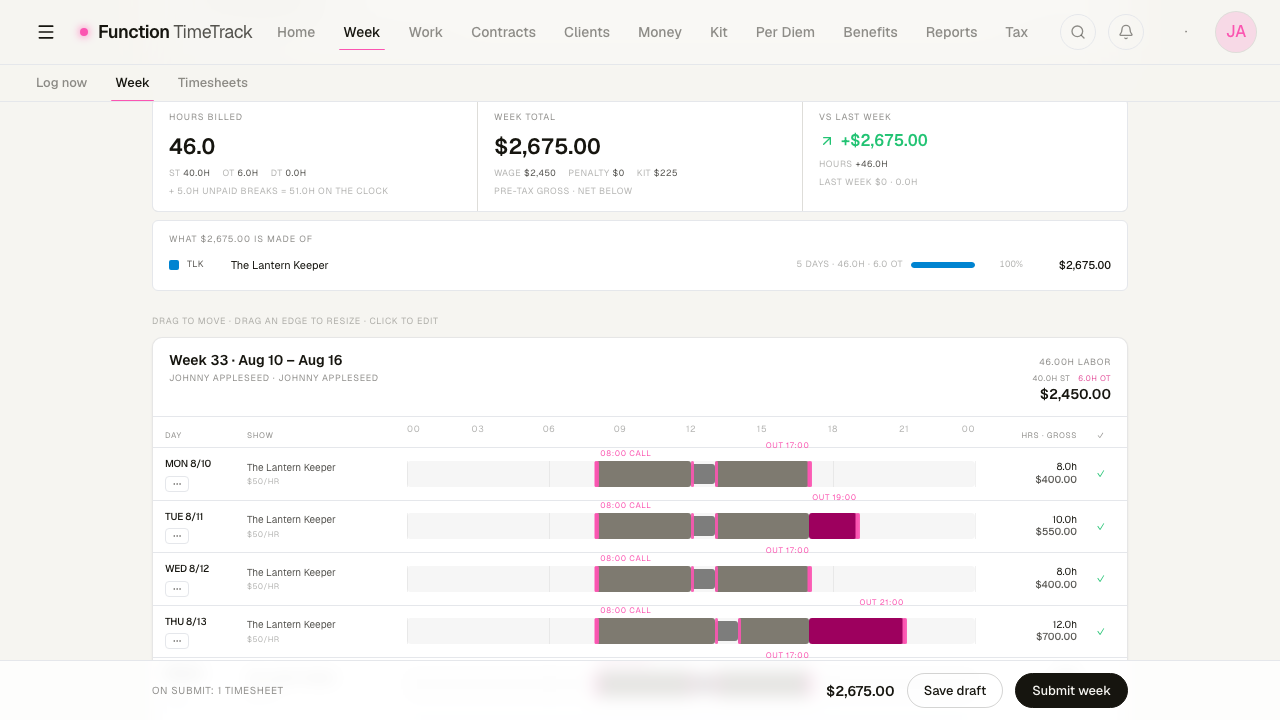
Part 2 — How gross becomes net
Once you have a gross, the Gross → net card shows the honest take-home. It reads as a waterfall: start at Gross, subtract each item, and land on Kept.
The card branches on how you're paid
The single biggest fork is your tax class:
- W-2 (employee) — the amounts shown are withheld for you. The card shows federal, state, local, and FICA (Social Security + Medicare).
- 1099 (self-employed / loan-out) — nothing is withheld, so the card shows what to set aside, and it includes self-employment (SE) tax in place of FICA.
The labels change accordingly ("Fed w/h" vs. "Fed set-aside," "FICA" vs. "SE tax"), so you always know whether the money is already gone or something you need to reserve.
What comes out, in order
- Federal tax — estimated from your filing status and pay frequency.
- State tax — from the rate the app resolves for your state (see the affordance below).
- Local / city tax — only shown when a local rate applies.
- FICA (W-2) or SE tax (1099) — the payroll-tax wedge.
- Below-the-line deductions — union dues, PAC contributions, and the like. These come out of your net; they do not reduce your taxable gross.
- Kept — your net for the period.
401(k) is a special case
A pre-tax 401(k) contribution reduces your federal and state taxable income — but it stays in the FICA base (payroll tax is still charged on the full gross). The card shows it as its own pre-tax line so you can see both effects.
Reimbursements are added back as "total kept"
If you had non-taxable reimbursements in the period (per diem, kit rental), the card surfaces them as a separate, un-taxed line and adds them to your net to show total kept. They were never in the taxable base, so they arrive here whole. This is why "total kept" can be higher than "net."
Two rates: effective vs. marginal
The card headlines the effective rate — total withheld ÷ gross — because that's what actually came out of this money. It also shows a smaller marginal badge (your next-dollar rate), sourced from a stable annual basis rather than this one week times 52, so a big week doesn't make it flash a scary top-bracket number.
Why big weeks and slow weeks look different
Withholding is an estimate applied per period. Big weeks tend to over-withhold; slow weeks under-withhold. It evens out on your annual return. The card says as much in its footnote — don't be alarmed by a high effective rate on a spike week.
How to read your own numbers
Check that your state is set
If the app hasn't resolved a state tax rate, the State row shows a "State — set your state" link instead of a number — it never silently drops to $0. If you see that affordance, your state withholding isn't being estimated yet.
- Click State — set your state on the card (or open Tax settings).
- Set your state (and local/city, if applicable) and your filing status.
- Return to the card — the State row now shows a real withholding.
A genuine no-tax state is different from an unset one
If you live in a state with no income tax, the row reads "State — no income tax" — that's a resolved answer, not a missing one. Only a truly unset state shows the "set your state" link.
Reconcile a real paycheck against the estimate
When a check lands, compare it to what the app expected:
- Match the gross first. Confirm the paystub's earned/worked pay matches the engine's gross for the same period. Watch for definition differences (funds, reimbursements) before assuming an error.
- Walk the withholding lines. Compare federal, state, local, and FICA/SE line by line against the card.
- Check below-the-line items. Dues and other deductions should match your net, not your taxable gross.
- Flag real deltas. A short check, a missing fund contribution, or a wrong withholding is a genuine discrepancy worth chasing — not a rounding artifact.
Money → Paid does step 1 for you, week by week. Each row puts what the app expected next to what the check actually paid, and prints the delta:
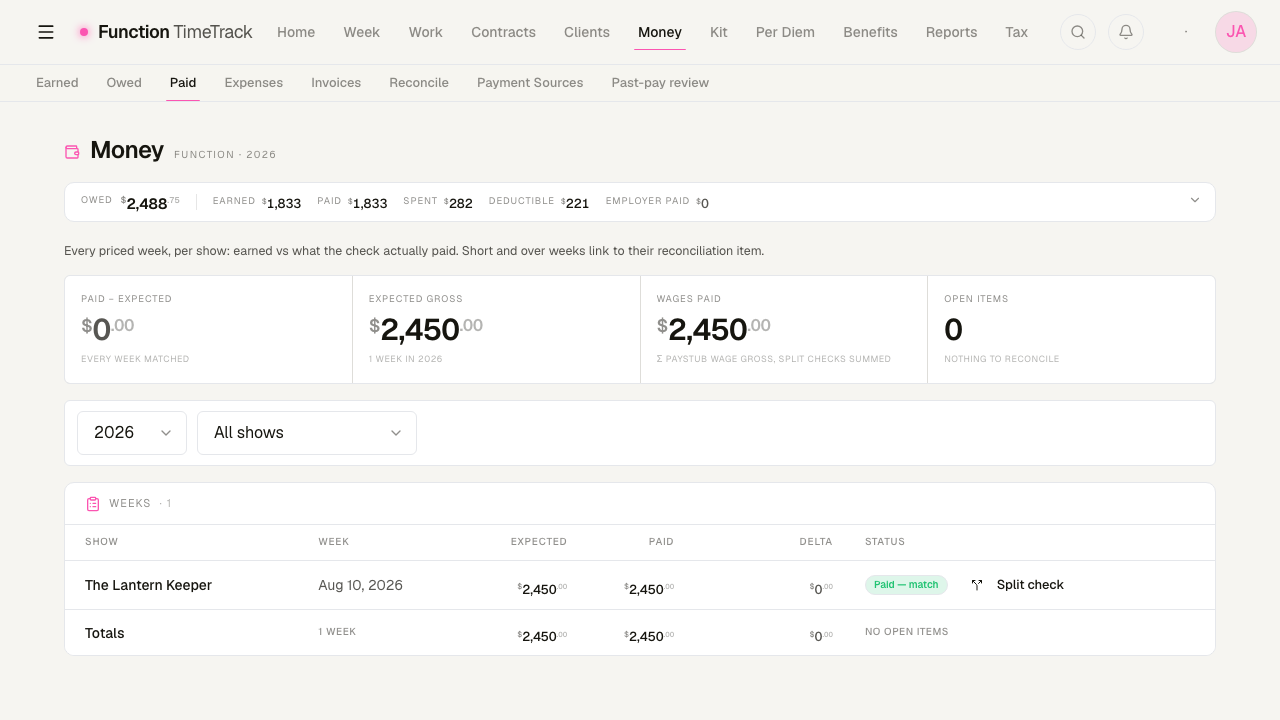
A week that does not match keeps its delta and links to its own reconciliation item, so a short check stays visible instead of being averaged away. The Split check control is for the common case where one payment covers several weeks — tell the app how the money divides and each week reconciles on its own.
Tip: log the week completely before you compare
The estimate is only as good as what you logged. Missing meal breaks, an unset work type, or a forgotten travel leg will move the gross — and therefore every downstream tax line. A few extra seconds per day makes reconciliation painless.
Common gotchas
- Reimbursements aren't income. Per diem and expense repayments are added to "total kept" but never taxed — don't expect them in your taxable gross. Kit fees are the exception: they are taxable and sit inside the taxed gross.
- Dues live below the line. They reduce your take-home but not your taxable income, so they never change your tax withholding.
- The engine gross ≠ every paystub gross. Compare like-for-like when reconciling.
- An unset state hides real tax. If you see "set your state," your net is optimistic until you fix it.
- W-2 vs. 1099 changes the meaning of every line. On 1099 the numbers are money to set aside, not money already gone — including SE tax.
- Estimates swing week to week. Effective rate on a single check is not your annual rate.
What you actually do
- Log each week honestly — real times, real breaks, the right work type per day.
- Keep your tax settings current — state, local, filing status, tax class (W-2 / 1099).
- Read the Gross → net card to understand take-home, and note "total kept" for the full cash picture.
- Reconcile real checks against the estimate and flag genuine deltas.
Event tagging
How holidays are detected automatically and how to tag events like pyro or costume fees so their premiums fire.
Per diem & travel
How Function Timetrack prices per-diem days — occupancy, high/low geography rules, opt-out caps, and travel-day proration — and how to set up per-diem city rules on a contract.